Stop frustrating customers with shallow automation. Learn exactly How to Use AI to Automate Customer Support effectively—resolving issues faster, lowering costs, and grounding AI in your real data. Read our step-by-step guide to transform your support team.
Here’s an uncomfortable stat to start with: research from Qualtrics found that nearly 1 in 5 consumers who used AI for customer support in 2026 said it gave them no benefit at all, a failure rate roughly four times higher than other AI use cases. And yet, done right, AI customer support is genuinely transformative, faster answers, lower costs, and support that never sleeps.
So what separates the businesses getting it right from the ones quietly frustrating their customers? Mostly, it comes down to how you automate, not whether you do.
This guide walks through exactly that: what to automate first, how to set it up properly, and how to avoid becoming another statistic in that Qualtrics report.
What Does It Actually Mean to “Automate” Customer Support with AI?
At its core, AI customer support automation means using machine learning and natural language processing to handle parts of the customer journey that used to require a human, answering common questions, routing tickets, summarizing conversations, even resolving issues end-to-end, without someone manually touching every interaction.
The best systems today don’t just match keywords and spit back a canned answer. They retrieve real information from your knowledge base, help center, and past interactions, understand what the customer actually needs, and either resolve it directly or hand it off to a human with full context attached.
That last part matters more than people realize. A lot of “AI support” that disappoints customers isn’t broken, it’s just shallow. It can read data but can’t act on it, so the AI starts the resolution and a human still has to finish it, which often creates more friction than the process it replaced.
Is AI Customer Support Actually Any Good, or Does It Just Annoy People?
Honestly, it depends entirely on how it’s implemented. This is one of the most searched questions on the topic, and it deserves a straight answer instead of a sales pitch.
When it works well, AI customer support delivers real results: faster resolutions, lower costs per interaction, and the ability to handle a much higher volume of queries without adding headcount. When it works badly, it’s usually for one of these reasons:
- It’s optimized for deflection, not resolution. A tool that’s measured on “tickets closed” instead of “problems actually solved” will happily bounce customers around without fixing anything.
- It has read-only access. If the AI can look up your order but can’t actually issue the refund or update the shipping address, it’s just a fancier FAQ page.
- It’s not grounded in your real data. An AI answering from generic training knowledge instead of your actual policies, inventory, and account data will confidently give wrong answers.
The fix for all three is the same: give your AI real access to your systems, ground it in your actual knowledge base, and measure it on resolution, not just deflection.
What Are the Best Support Tasks to Automate First?
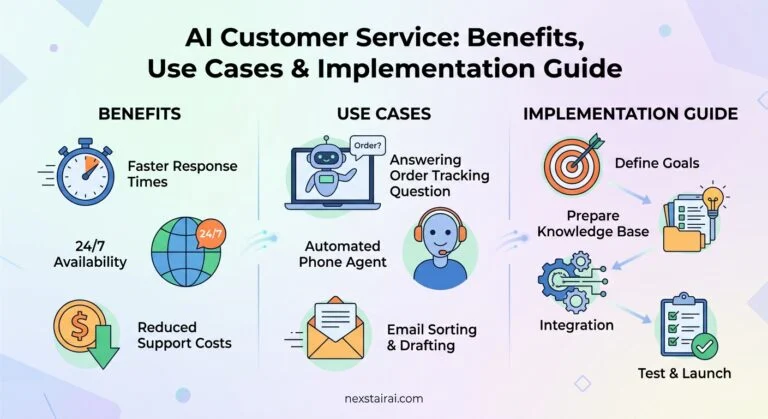
Don’t try to automate everything on day one. Start with the tasks that are high-volume, repetitive, and low-risk if something goes slightly wrong. In order of typical payoff:
- FAQ and policy questions — shipping times, return windows, business hours, pricing. Repetitive, low-stakes, and usually the fastest win.
- Order status and tracking — customers asking “where’s my order” is one of the single highest-volume ticket types for most businesses.
- Ticket routing and tagging — even before you automate the answer, automating which team or agent gets the ticket saves real time.
- Conversation summarization — AI that summarizes a long back-and-forth thread so your human agents don’t have to re-read everything from scratch.
- Simple account actions — password resets, updating an address, checking a balance, things with a clear, low-risk action attached.
Save the emotionally complex, high-stakes, or ambiguous issues for human agents, at least until your AI has proven itself on the simpler cases first.
See This in Action Before You Build It Yourself
If you’re picturing your own support inbox while reading this, it’s worth seeing what’s actually possible before you commit to a build. Nexstair’s AI Chatbot is trained on your real business data and can handle FAQs, order questions, and routine requests around the clock, no coding required. Try it free and see how it handles your actual customer questions.
How Do You Actually Set Up AI Customer Support, Step by Step?
Here’s a realistic rollout plan, not a “flip a switch” fantasy:
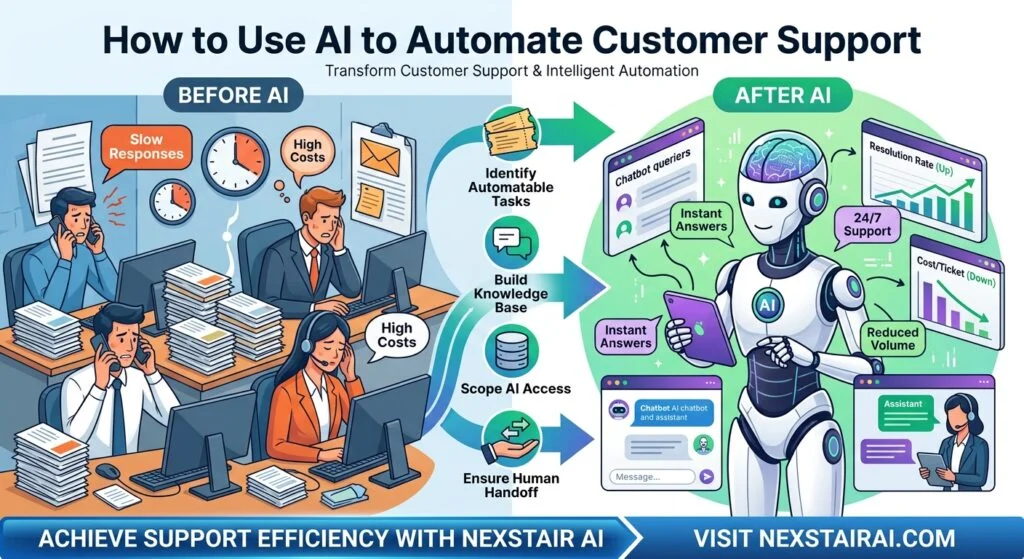
- Set a clear goal. Define the specific problem you’re solving, response time, ticket volume, after-hours coverage, and pick one metric to prove it worked.
- Get your knowledge base in order. Your AI is only as good as what it’s grounded in. Outdated help articles or missing policy info will show up as wrong answers fast.
- Start with one channel. Pick your highest-volume channel (usually website chat or email) rather than launching across every channel simultaneously.
- Give it real, scoped access. Connect it to the systems it actually needs, order data, account info, so it can act, not just answer, within clearly defined limits.
- Build in a clean handoff. Make sure there’s an obvious, frictionless path to a human agent, with full conversation context carried over, for anything the AI shouldn’t handle alone.
- Test with real questions before going live. Run your actual, messiest customer questions through it first. Generic demo questions will always look great; your real edge cases are the actual test.
- Launch, then watch closely. The first few weeks matter most. Review a sample of real conversations regularly, not just the dashboard summary.
What Tools Do You Actually Need?
You don’t need to stitch together a dozen separate platforms. At minimum, look for a tool that combines:
- A knowledge base connection, so answers are grounded in your actual content, not generic training data
- Intent detection, so it understands why a customer is reaching out, not just keyword-matches their message
- Real system access, so it can take action (check an order, issue a refund) rather than just describing what a human should do
- Clean handoff to a human, with context preserved, for anything outside its scope
- Reporting you can actually read, so you can see resolution rates, not just conversation counts
The good news: this no longer requires an enterprise budget or a technical team to stand up.
Not Sure Which Tasks Are Worth Automating First?
Every support inbox is a little different. Nexstair’s AI Assistant is built to plug into your existing workflow and start with the repetitive, high-volume questions eating up your team’s day, then grow from there as you see what’s working. Explore the AI Assistant to see what it could take off your plate.
How Do You Make Sure AI Doesn’t Give Wrong Answers?
This is the concern that stops a lot of businesses from starting, and it’s a fair one. A few practical safeguards:
- Ground it in your own content. AI that retrieves answers directly from your help center and policies, and can cite where an answer came from, is far more reliable than one working from general knowledge.
- Set clear boundaries on what it can do alone. Low-risk actions (checking order status) can run fully automated. Higher-stakes actions (large refunds, account cancellations) can require a quick human approval step.
- Keep your knowledge base current. A surprising amount of “AI hallucination” in support contexts is really just outdated source material, not a model problem.
- Review real conversations regularly. Spot-check actual transcripts weekly, not just satisfaction scores, especially in the first month or two.
What Metrics Should You Actually Track?
Skip vanity metrics like “conversations handled” and focus on the numbers that show real impact:
- Resolution rate — how many issues were actually solved, not just responded to
- First response time and average resolution time
- Escalation rate — how often the AI hands off to a human, and whether that rate is trending down as it improves
- Customer satisfaction (CSAT) specifically on AI-handled conversations, tracked separately from human-handled ones
- Cost per resolution, compared to your pre-automation baseline
If you’re only tracking ticket volume and deflection rate, you’re measuring the exact pattern that leads to the frustrated customers in that Qualtrics report.
Can AI Handle Complex or Emotional Customer Issues?
Not well, at least not alone, and that’s fine. The best-performing setups in 2026 use a hybrid model on purpose: AI handles the repetitive, well-defined volume, and humans stay firmly in charge of anything complex, emotionally charged, or ambiguous.
Sentiment analysis is increasingly used as the trigger for that handoff, if a system detects frustration or urgency building in a conversation, it escalates to a human proactively instead of waiting for the customer to demand one. That single feature alone prevents a lot of the “AI stonewalling an upset customer” horror stories that make the rounds online.
Frequently Asked Questions
Will AI customer support replace my support team? For most businesses, no. It typically absorbs the repetitive, high-volume questions, freeing your team to focus on the complex, high-value conversations that actually need a human.
How much of my support volume can realistically be automated? It varies by business, but FAQs, order status, and routine account actions are commonly the biggest share of ticket volume, often the majority, for retail and service businesses, making them the natural starting point.
Is AI customer support only for large companies? No. Affordable, no-code AI chatbot and assistant tools now let small businesses automate FAQs and routine requests without hiring a technical team.
What’s the biggest mistake businesses make when automating support? Optimizing for ticket deflection instead of actual resolution. If your AI is measured on “conversations closed” rather than “problems solved,” customer satisfaction usually suffers even as your dashboard looks great.
How do I know if my AI support is actually working? Track resolution rate and CSAT specifically for AI-handled conversations, not just volume metrics, and read a sample of real transcripts regularly rather than relying only on automated reporting.
The Bottom Line | How to Use AI to Automate Customer Support
AI customer support done well isn’t about replacing your team or chasing a deflection number, it’s about handling the repetitive volume so your people can focus on the conversations that actually need a human touch. Start with your highest-volume, lowest-risk questions, ground your AI in real data, keep a clean path to a human for everything else, and measure resolution, not just responses.
Ready to see it working on your own support inbox? Get started with Nexstair AI today and let an AI chatbot or assistant handle the repetitive questions your team answers every single day.

 can help you build one that actually fits the way you work.** ## What Technologies Power an AI Virtual Assistant? Here's a quick, scannable summary of the main building blocks: | Technology | What It Does | |---|---| | **Natural Language Processing (NLP)** | Helps the assistant read and interpret human language | | **Natural Language Understanding (NLU)** | Identifies intent and extracts key details from a request | | **Large Language Models (LLMs)** | Generate flexible, human-like responses and handle complex questions | | **Speech Recognition (ASR)** | Converts spoken words into text | | **Text-to-Speech (TTS)** | Converts text responses into natural-sounding speech | | **Machine Learning (ML)** | Helps the system learn patterns and improve over time | | **APIs and Integrations** | Connect the assistant to business tools and data | | **Knowledge Base / Retrieval** | Gives the assistant accurate, up-to-date information to draw from | ## What Are the Different Types of AI Virtual Assistants? Not every virtual assistant works the same way. Here are the main categories. **Rule-based assistants.** These follow pre-written scripts and decision trees. They're predictable and good for simple tasks, but they struggle when customers phrase things unexpectedly. **AI-powered conversational assistants.** These use NLP and machine learning to understand free-form language. They're far more flexible and can handle a wide range of questions. **LLM-powered assistants.** The newest generation uses large language models to hold fluid, natural conversations, summarize information, and reason through multi-part requests. **Voice assistants.** These specialize in spoken interactions, whether on smart speakers, phones, or automated call systems. **Agentic assistants.** An emerging category, these assistants don't just respond; they can plan and carry out multi-step tasks on your behalf, such as researching options, filling out forms, or coordinating across several apps, all within boundaries you define. ## What Is the Difference Between an AI Virtual Assistant and a Chatbot? People often use these terms interchangeably, but there's a useful distinction. A **chatbot** is typically designed for a narrow purpose, usually answering questions or following a set script within a chat window. A **virtual assistant** is generally broader: it understands context, works across multiple channels, connects to several systems, and can complete a wider range of tasks. In practice, the line is blurring. Many modern chatbots are really AI virtual assistants under the hood. The key difference to look for is capability: can it merely respond, or can it understand, remember, and act? ## What Are the Real-World Uses of AI Virtual Assistants? Virtual assistants are showing up in nearly every industry. Here are some of the most common uses. **Customer support.** Answering FAQs, tracking orders, handling returns, and escalating tricky issues to human agents, all around the clock. **E-commerce.** Recommending products, answering sizing and shipping questions, and nudging shoppers who hesitate at checkout. **Healthcare.** Scheduling appointments, sending reminders, and answering basic administrative questions (while leaving medical decisions to professionals). **Banking and finance.** Checking balances, explaining fees, and guiding customers through routine account tasks securely. **Real estate.** Answering listing questions, qualifying leads, and booking property viewings. **Hospitality and travel.** Handling reservations, itinerary questions, and local recommendations. **Human resources.** Answering employee questions about policies, benefits, and time off, and helping with onboarding. **Sales and marketing.** Qualifying leads, capturing contact details, and booking demos for the sales team. ## What Are the Benefits of Using an AI Virtual Assistant? Businesses and individuals adopt virtual assistants for good reasons. - **24/7 availability.** Help is there whenever customers need it, across every time zone. - **Instant responses.** No more waiting in queues or for email replies. - **Cost efficiency.** Handling more conversations without proportionally growing your team. - **Consistency.** The same accurate answer every time, based on your approved information. - **Scalability.** Whether you have ten conversations a day or ten thousand, the assistant keeps up. - **Happier teams.** Employees spend less time on repetitive tasks and more on meaningful work. - **Useful insights.** Conversations reveal what customers really want to know, helping you improve your products, website, and policies. - **More sales.** Quick answers and helpful recommendations remove friction and help customers complete purchases. **Curious how much time and money a virtual assistant could save your business? [nexstairai.com](https://nexstairai.com/) can help you map out the opportunity and get started without the guesswork.** ## What Are the Limitations of AI Virtual Assistants? It's worth being realistic. Even great assistants have limits. - **They can misunderstand.** Unusual phrasing, heavy ambiguity, or very niche topics may trip them up. - **They depend on their information.** If the knowledge base is outdated or incomplete, the answers will be too. - **They can sometimes be wrong.** Language-model-based systems may occasionally produce confident but inaccurate responses, which is why guardrails and good source material matter. - **They lack true human empathy.** They can detect sentiment, but emotionally sensitive situations still benefit from a real person. - **Privacy and security need attention.** Handling personal data responsibly requires proper safeguards and compliance. The good news is that all of these can be managed with thoughtful design: clear boundaries, quality information, regular reviews, and an easy path to a human when needed. ## How Do You Choose the Right AI Virtual Assistant for Your Business? If you're thinking about adopting one, ask yourself these questions. 1. **What problem am I solving?** Support volume, lead capture, scheduling, internal help, or something else? 2. **Which channels do my customers use?** Website, WhatsApp, Instagram, email, phone? 3. **What systems does it need to connect to?** Your CRM, calendar, store, or helpdesk? 4. **How customizable is it?** Can you control tone, workflows, and escalation rules? 5. **How does it handle human handoff?** The transition should be smooth, with full context passed along. 6. **What does security look like?** Look for data protection and compliance with regulations relevant to your customers. 7. **Can I see performance data?** Good analytics help you measure and improve. 8. **What support will I get?** Setup and ongoing optimization make a big difference to results. ## How Do You Get Started With an AI Virtual Assistant? You don't need a massive project to begin. A simple path looks like this: 1. **Identify your top 5 to 10 most common customer questions or tasks.** 2. **Gather accurate, up-to-date information** such as FAQs, policies, and product details. 3. **Choose a platform or partner** that fits your needs and integrates with your tools. 4. **Set up and test** with real-world questions before launching. 5. **Launch on one channel first**, then expand as you gain confidence. 6. **Review conversations regularly**, improving responses and adding new capabilities over time. Starting small and growing steadily is almost always better than trying to automate everything at once. ## What Does the Future Hold for AI Virtual Assistants? The technology is moving quickly. A few trends worth watching: - **More proactive help.** Assistants that reach out with useful information before you ask, such as shipping delays or appointment reminders. - **Greater autonomy.** Agentic assistants that complete multi-step tasks within rules you set. - **Richer personalization.** Better memory of preferences and history, creating more natural, tailored experiences. - **Multimodal interaction.** Assistants that understand text, voice, images, and documents all in one conversation. - **Smoother voice experiences.** Phone and voice interactions that feel increasingly human and natural. - **Stronger safeguards.** Better accuracy controls, privacy protections, and transparency about when you're talking to AI. The businesses that start learning and experimenting now will be best positioned to benefit as these capabilities mature. ## Final Thoughts: Is an AI Virtual Assistant Worth It? An AI virtual assistant is, at its heart, a digital teammate. It listens to what people ask, understands what they mean, finds or does what's needed, and responds in a way that feels natural, all in a matter of seconds and at any hour of the day. Under the hood, it's a clever combination of speech recognition, language understanding, decision-making, integrations, and language generation. But from the customer's point of view, it's simple: they ask, and they get helped. For businesses, the payoff is faster service, lower costs, happier teams, and more room to grow. The key is to start with a clear goal, give your assistant good information, keep humans available for the moments that matter, and keep improving based on real conversations. **Ready to bring an AI virtual assistant into your business? Visit [nexstairai.com](https://nexstairai.com/) to explore how a custom-built assistant can help you serve customers better, save time, and grow with confidence.** --- Want me to write a follow-up next? Good options might be "AI Virtual Assistant vs. Chatbot: What's the Difference?" or "How to Train an AI Virtual Assistant on Your Business Data.](https://nexstairai.com/wp-content/uploads/2026/10/🚀-Supercharge-Your-Business-Growth-with-Nexstair-–-AI-Digital-Marketing-Agency-300x164.jpg.webp)
 can help you build one that actually fits the way you work.** ## What Technologies Power an AI Virtual Assistant? Here's a quick, scannable summary of the main building blocks: | Technology | What It Does | |---|---| | **Natural Language Processing (NLP)** | Helps the assistant read and interpret human language | | **Natural Language Understanding (NLU)** | Identifies intent and extracts key details from a request | | **Large Language Models (LLMs)** | Generate flexible, human-like responses and handle complex questions | | **Speech Recognition (ASR)** | Converts spoken words into text | | **Text-to-Speech (TTS)** | Converts text responses into natural-sounding speech | | **Machine Learning (ML)** | Helps the system learn patterns and improve over time | | **APIs and Integrations** | Connect the assistant to business tools and data | | **Knowledge Base / Retrieval** | Gives the assistant accurate, up-to-date information to draw from | ## What Are the Different Types of AI Virtual Assistants? Not every virtual assistant works the same way. Here are the main categories. **Rule-based assistants.** These follow pre-written scripts and decision trees. They're predictable and good for simple tasks, but they struggle when customers phrase things unexpectedly. **AI-powered conversational assistants.** These use NLP and machine learning to understand free-form language. They're far more flexible and can handle a wide range of questions. **LLM-powered assistants.** The newest generation uses large language models to hold fluid, natural conversations, summarize information, and reason through multi-part requests. **Voice assistants.** These specialize in spoken interactions, whether on smart speakers, phones, or automated call systems. **Agentic assistants.** An emerging category, these assistants don't just respond; they can plan and carry out multi-step tasks on your behalf, such as researching options, filling out forms, or coordinating across several apps, all within boundaries you define. ## What Is the Difference Between an AI Virtual Assistant and a Chatbot? People often use these terms interchangeably, but there's a useful distinction. A **chatbot** is typically designed for a narrow purpose, usually answering questions or following a set script within a chat window. A **virtual assistant** is generally broader: it understands context, works across multiple channels, connects to several systems, and can complete a wider range of tasks. In practice, the line is blurring. Many modern chatbots are really AI virtual assistants under the hood. The key difference to look for is capability: can it merely respond, or can it understand, remember, and act? ## What Are the Real-World Uses of AI Virtual Assistants? Virtual assistants are showing up in nearly every industry. Here are some of the most common uses. **Customer support.** Answering FAQs, tracking orders, handling returns, and escalating tricky issues to human agents, all around the clock. **E-commerce.** Recommending products, answering sizing and shipping questions, and nudging shoppers who hesitate at checkout. **Healthcare.** Scheduling appointments, sending reminders, and answering basic administrative questions (while leaving medical decisions to professionals). **Banking and finance.** Checking balances, explaining fees, and guiding customers through routine account tasks securely. **Real estate.** Answering listing questions, qualifying leads, and booking property viewings. **Hospitality and travel.** Handling reservations, itinerary questions, and local recommendations. **Human resources.** Answering employee questions about policies, benefits, and time off, and helping with onboarding. **Sales and marketing.** Qualifying leads, capturing contact details, and booking demos for the sales team. ## What Are the Benefits of Using an AI Virtual Assistant? Businesses and individuals adopt virtual assistants for good reasons. - **24/7 availability.** Help is there whenever customers need it, across every time zone. - **Instant responses.** No more waiting in queues or for email replies. - **Cost efficiency.** Handling more conversations without proportionally growing your team. - **Consistency.** The same accurate answer every time, based on your approved information. - **Scalability.** Whether you have ten conversations a day or ten thousand, the assistant keeps up. - **Happier teams.** Employees spend less time on repetitive tasks and more on meaningful work. - **Useful insights.** Conversations reveal what customers really want to know, helping you improve your products, website, and policies. - **More sales.** Quick answers and helpful recommendations remove friction and help customers complete purchases. **Curious how much time and money a virtual assistant could save your business? [nexstairai.com](https://nexstairai.com/) can help you map out the opportunity and get started without the guesswork.** ## What Are the Limitations of AI Virtual Assistants? It's worth being realistic. Even great assistants have limits. - **They can misunderstand.** Unusual phrasing, heavy ambiguity, or very niche topics may trip them up. - **They depend on their information.** If the knowledge base is outdated or incomplete, the answers will be too. - **They can sometimes be wrong.** Language-model-based systems may occasionally produce confident but inaccurate responses, which is why guardrails and good source material matter. - **They lack true human empathy.** They can detect sentiment, but emotionally sensitive situations still benefit from a real person. - **Privacy and security need attention.** Handling personal data responsibly requires proper safeguards and compliance. The good news is that all of these can be managed with thoughtful design: clear boundaries, quality information, regular reviews, and an easy path to a human when needed. ## How Do You Choose the Right AI Virtual Assistant for Your Business? If you're thinking about adopting one, ask yourself these questions. 1. **What problem am I solving?** Support volume, lead capture, scheduling, internal help, or something else? 2. **Which channels do my customers use?** Website, WhatsApp, Instagram, email, phone? 3. **What systems does it need to connect to?** Your CRM, calendar, store, or helpdesk? 4. **How customizable is it?** Can you control tone, workflows, and escalation rules? 5. **How does it handle human handoff?** The transition should be smooth, with full context passed along. 6. **What does security look like?** Look for data protection and compliance with regulations relevant to your customers. 7. **Can I see performance data?** Good analytics help you measure and improve. 8. **What support will I get?** Setup and ongoing optimization make a big difference to results. ## How Do You Get Started With an AI Virtual Assistant? You don't need a massive project to begin. A simple path looks like this: 1. **Identify your top 5 to 10 most common customer questions or tasks.** 2. **Gather accurate, up-to-date information** such as FAQs, policies, and product details. 3. **Choose a platform or partner** that fits your needs and integrates with your tools. 4. **Set up and test** with real-world questions before launching. 5. **Launch on one channel first**, then expand as you gain confidence. 6. **Review conversations regularly**, improving responses and adding new capabilities over time. Starting small and growing steadily is almost always better than trying to automate everything at once. ## What Does the Future Hold for AI Virtual Assistants? The technology is moving quickly. A few trends worth watching: - **More proactive help.** Assistants that reach out with useful information before you ask, such as shipping delays or appointment reminders. - **Greater autonomy.** Agentic assistants that complete multi-step tasks within rules you set. - **Richer personalization.** Better memory of preferences and history, creating more natural, tailored experiences. - **Multimodal interaction.** Assistants that understand text, voice, images, and documents all in one conversation. - **Smoother voice experiences.** Phone and voice interactions that feel increasingly human and natural. - **Stronger safeguards.** Better accuracy controls, privacy protections, and transparency about when you're talking to AI. The businesses that start learning and experimenting now will be best positioned to benefit as these capabilities mature. ## Final Thoughts: Is an AI Virtual Assistant Worth It? An AI virtual assistant is, at its heart, a digital teammate. It listens to what people ask, understands what they mean, finds or does what's needed, and responds in a way that feels natural, all in a matter of seconds and at any hour of the day. Under the hood, it's a clever combination of speech recognition, language understanding, decision-making, integrations, and language generation. But from the customer's point of view, it's simple: they ask, and they get helped. For businesses, the payoff is faster service, lower costs, happier teams, and more room to grow. The key is to start with a clear goal, give your assistant good information, keep humans available for the moments that matter, and keep improving based on real conversations. **Ready to bring an AI virtual assistant into your business? Visit [nexstairai.com](https://nexstairai.com/) to explore how a custom-built assistant can help you serve customers better, save time, and grow with confidence.** --- Want me to write a follow-up next? Good options might be "AI Virtual Assistant vs. Chatbot: What's the Difference?" or "How to Train an AI Virtual Assistant on Your Business Data.](https://nexstairai.com/wp-content/uploads/2026/10/🚀-Supercharge-Your-Business-Growth-with-Nexstair-–-AI-Digital-Marketing-Agency-768x419.jpg.webp)