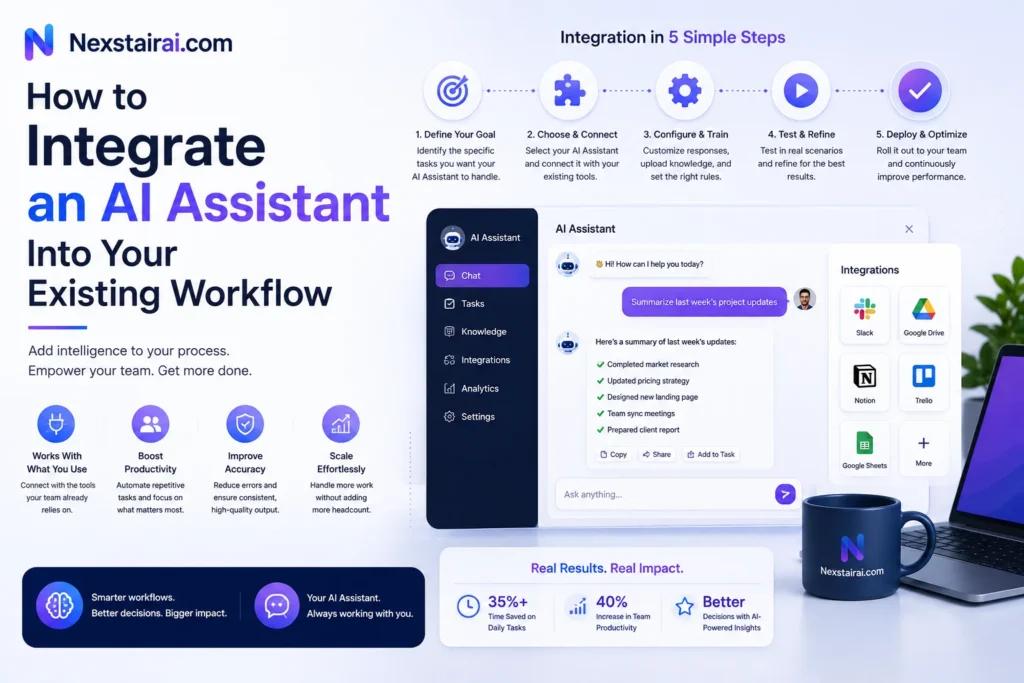
The businesses that get the most out of an AI assistant don’t rebuild their tech stack around it. They connect it to the tools they’re already using, whether that’s a CRM, a help desk, email, or a project management board, and let it work inside processes that already exist. This guide walks through how that integration actually happens, step by step, without the disruption most teams expect.
Start With the Bottleneck, Not the Tool
The most common mistake in AI adoption is picking a platform first and figuring out what to automate second. Flip that order. Look across your team’s day-to-day work and find the single task that eats the most hours while adding the least value: answering the same customer questions on repeat, manually logging leads into a spreadsheet, or copying data between two systems that don’t talk to each other.
That task becomes your starting point. It should be repetitive, standardized enough that the steps don’t change much from one instance to the next, and high-volume enough that automating it produces a measurable result within weeks, not months. Trying to automate every department at once tends to overwhelm a team before it ever proves the value of the tool.
Map the Workflow Before You Touch a Tool
Once you’ve picked the bottleneck, write down exactly how it works today. What triggers the task, what information gets touched, who’s involved, and what the finished result looks like. This step gets skipped constantly, and it’s usually why an integration stalls.
Process mapping does two things. It shows you where the AI assistant actually needs to plug in, and it surfaces dependencies you’d otherwise discover the hard way, mid-rollout. If your support team currently checks three different systems to answer one customer question, that’s useful to know before you configure an assistant to do the same, not after.
Check Your Data Before You Automate Anything
An AI assistant is only as useful as the data it can access. Before connecting it to anything, make sure the information it will pull from, whether that’s a knowledge base, a CRM, or past support tickets, is accurate, current, and organized enough to be useful.
This matters more than most teams expect going in. An assistant trained on outdated pricing, duplicate customer records, or a knowledge base full of contradictory answers will hand out wrong information just as confidently as it hands out right information. Cleaning this up first, even if it feels like a delay, saves you from having to walk back bad answers after launch.
This is also the right stage to decide what the assistant should never touch without human review. Sensitive categories like payment details, health records, or legal terms often warrant a review step even after an integration is otherwise running smoothly, and deciding that boundary before launch is far easier than adding it in after an incident.
Choose an Assistant That Fits Your Existing Systems, Not the Other Way Around
The AI assistant market splits roughly into two categories: customer-facing tools that handle client-side requests, and back-end tools that manage internal tasks like data entry, scheduling, and reporting. Some businesses need one category, some need both, and the right choice depends on where your actual bottleneck sits.
Whichever category fits, prioritize a platform that connects to what you already use rather than one that requires you to migrate your CRM, ticketing system, or calendar to match it. Most modern assistants integrate directly with common tools like Salesforce, HubSpot, Zendesk, Slack, and Google Workspace, either through built-in connections or no-code automation platforms that link an assistant to thousands of apps without custom development. If a platform’s pitch depends on you replacing tools your team already knows how to use, that’s a sign the integration will cost more time than it saves.
Use Automation Platforms to Avoid Custom Development
You don’t need an engineering team to connect an AI assistant to your existing software. No-code automation platforms exist specifically to bridge AI tools and business software without writing a line of code, using prebuilt connectors instead of custom integration work.
These platforms typically work through triggers and actions. A new form submission triggers the assistant to qualify the lead and log it in your CRM. An incoming support ticket triggers the assistant to categorize it, respond if it’s routine, or route it to the right person if it’s not. This approach is how most small and mid-sized businesses actually operationalize AI, connecting existing tools to each other through automated workflows rather than building anything from scratch.
Give the Assistant Real Actions, Not Just Answers
A capable AI assistant does more than generate a text response. It can look up real-time information, like checking an order status directly in your inventory system, take action inside another tool, like updating a ticket’s priority or tagging a lead, and hand a task off to a human the moment it hits the edge of what it can confidently handle.
This last piece matters more than it might seem. An assistant that recognizes its own limits and escalates cleanly, rather than guessing, is what keeps customers and staff trusting the system. Configure clear handoff rules early, before launch, rather than discovering the gaps after a customer gets a wrong answer.
Roll It Out in Stages, Not All at Once
Launch the integration on one workflow, with a small group of users if possible, before expanding it across the team. This lets you catch configuration issues while the stakes are still low and gives your team time to adjust to a new tool in their process without feeling like everything changed overnight.
Most modern platforms let you build and launch a first workflow within minutes rather than months, which makes staged rollout far less disruptive than it used to be. Once the first workflow is running cleanly and the team trusts the output, expand to the next bottleneck on your list.
Keep Someone Accountable for the Integration
Integrations stall most often when no one owns them. Assign a specific person, not a committee, to be responsible for the rollout, and keep a regular check-in cadence with anyone technical who’s helping set it up. Teams that treat AI adoption as a shared side project, without a clear owner, tend to lose momentum within the first few weeks.
Equally important is how you frame the change internally. Present the assistant as something that takes on repetitive work so your team can focus on what actually needs a human, not as a replacement for anyone’s role. Teams that hear this framing clearly, and see it reflected in how the rollout actually happens, adapt to a new AI assistant far faster than teams left to guess at the intent behind it.
Measure What Actually Changed
Before you can call an integration successful, you need a baseline. How long did the task take before automation, how many errors or escalations happened, and what did it cost in hours per week? Track the same numbers after rollout and compare.
Common measurable outcomes include reduced time spent on the automated task, fewer errors in data entry or categorization, and higher throughput on the same task without adding staff. If a metric doesn’t move after a few weeks, that’s a signal to revisit the configuration, not necessarily the tool itself. Most integration problems come down to a workflow that was mapped incompletely at the start, not a limitation of the assistant.
Common Pitfalls to Avoid
A few mistakes show up repeatedly across businesses integrating AI assistants for the first time, and most are avoidable with a bit of foresight.
Trying to solve every problem at once is the most frequent one. A business that connects an assistant to five workflows simultaneously loses the ability to tell which change caused which result, and any early hiccup gets blamed on the tool rather than a specific misconfigured step. Skipping the data cleanup stage is another common trap, since an assistant pulling from a messy CRM or an outdated knowledge base will confidently repeat whatever errors already exist in that data. And underestimating change management, treating the rollout as purely a technical task rather than one that also requires clear communication with the team using it, tends to slow adoption even when the tool itself works exactly as intended.
None of these are reasons to avoid integrating an AI assistant. They’re reasons to slow down slightly at the start so the rollout doesn’t stall six weeks in.
Getting Started
The pattern that works, across nearly every business that’s done this well, is the same: pick one bottleneck, map it clearly, clean the data behind it, connect the assistant through existing tools rather than new ones, and expand only once the first workflow is proven.
Nexstair AI’s AI Assistant is built to plug into the systems you already run, without requiring a rebuild of your existing stack. If you’re also curious how your site’s visibility holds up, our SEO Audit Report is a useful next step to check alongside any workflow changes.
Frequently Asked Questions
What’s the first step in integrating an AI assistant into my workflow?
Identify the single most repetitive, time-consuming task your team handles, then map exactly how it works today before choosing or configuring any tool. Starting with the bottleneck, not the software, is what determines whether the integration actually gets used.
Do I need technical skills to integrate an AI assistant?
Not usually. No-code automation platforms connect AI assistants to tools like your CRM, help desk, and calendar through prebuilt connectors, so most small and mid-sized businesses can set up an integration without custom development.
How long does integrating an AI assistant typically take?
A single, well-scoped workflow can often be built and launched within days using modern platforms. Full-team rollout across multiple workflows tends to take longer, but staging the rollout keeps each phase short and manageable.
What tools can an AI assistant integrate with?
Most business assistants connect to common software including CRMs like Salesforce and HubSpot, help desks like Zendesk, communication tools like Slack, and calendar or email platforms through Google Workspace or Microsoft 365.
What causes AI assistant integrations to fail?
The most common causes are unclear ownership of the rollout, poor data quality feeding the assistant, and trying to automate too many workflows at once instead of proving value on a single bottleneck first.
Should I automate customer-facing tasks or internal tasks first?
That depends on where your bottleneck actually sits. Businesses fielding high volumes of repetitive customer questions often see faster returns starting customer-facing, while teams buried in manual data entry or reporting often benefit more from starting with internal automation.
How do I know if the integration is working?
Compare task completion time, error rates, and volume handled before and after rollout against a clear baseline. If none of these measurably improve within a few weeks, the workflow likely needs reconfiguring rather than replacing the tool.

 can help you build one that actually fits the way you work.** ## What Technologies Power an AI Virtual Assistant? Here's a quick, scannable summary of the main building blocks: | Technology | What It Does | |---|---| | **Natural Language Processing (NLP)** | Helps the assistant read and interpret human language | | **Natural Language Understanding (NLU)** | Identifies intent and extracts key details from a request | | **Large Language Models (LLMs)** | Generate flexible, human-like responses and handle complex questions | | **Speech Recognition (ASR)** | Converts spoken words into text | | **Text-to-Speech (TTS)** | Converts text responses into natural-sounding speech | | **Machine Learning (ML)** | Helps the system learn patterns and improve over time | | **APIs and Integrations** | Connect the assistant to business tools and data | | **Knowledge Base / Retrieval** | Gives the assistant accurate, up-to-date information to draw from | ## What Are the Different Types of AI Virtual Assistants? Not every virtual assistant works the same way. Here are the main categories. **Rule-based assistants.** These follow pre-written scripts and decision trees. They're predictable and good for simple tasks, but they struggle when customers phrase things unexpectedly. **AI-powered conversational assistants.** These use NLP and machine learning to understand free-form language. They're far more flexible and can handle a wide range of questions. **LLM-powered assistants.** The newest generation uses large language models to hold fluid, natural conversations, summarize information, and reason through multi-part requests. **Voice assistants.** These specialize in spoken interactions, whether on smart speakers, phones, or automated call systems. **Agentic assistants.** An emerging category, these assistants don't just respond; they can plan and carry out multi-step tasks on your behalf, such as researching options, filling out forms, or coordinating across several apps, all within boundaries you define. ## What Is the Difference Between an AI Virtual Assistant and a Chatbot? People often use these terms interchangeably, but there's a useful distinction. A **chatbot** is typically designed for a narrow purpose, usually answering questions or following a set script within a chat window. A **virtual assistant** is generally broader: it understands context, works across multiple channels, connects to several systems, and can complete a wider range of tasks. In practice, the line is blurring. Many modern chatbots are really AI virtual assistants under the hood. The key difference to look for is capability: can it merely respond, or can it understand, remember, and act? ## What Are the Real-World Uses of AI Virtual Assistants? Virtual assistants are showing up in nearly every industry. Here are some of the most common uses. **Customer support.** Answering FAQs, tracking orders, handling returns, and escalating tricky issues to human agents, all around the clock. **E-commerce.** Recommending products, answering sizing and shipping questions, and nudging shoppers who hesitate at checkout. **Healthcare.** Scheduling appointments, sending reminders, and answering basic administrative questions (while leaving medical decisions to professionals). **Banking and finance.** Checking balances, explaining fees, and guiding customers through routine account tasks securely. **Real estate.** Answering listing questions, qualifying leads, and booking property viewings. **Hospitality and travel.** Handling reservations, itinerary questions, and local recommendations. **Human resources.** Answering employee questions about policies, benefits, and time off, and helping with onboarding. **Sales and marketing.** Qualifying leads, capturing contact details, and booking demos for the sales team. ## What Are the Benefits of Using an AI Virtual Assistant? Businesses and individuals adopt virtual assistants for good reasons. - **24/7 availability.** Help is there whenever customers need it, across every time zone. - **Instant responses.** No more waiting in queues or for email replies. - **Cost efficiency.** Handling more conversations without proportionally growing your team. - **Consistency.** The same accurate answer every time, based on your approved information. - **Scalability.** Whether you have ten conversations a day or ten thousand, the assistant keeps up. - **Happier teams.** Employees spend less time on repetitive tasks and more on meaningful work. - **Useful insights.** Conversations reveal what customers really want to know, helping you improve your products, website, and policies. - **More sales.** Quick answers and helpful recommendations remove friction and help customers complete purchases. **Curious how much time and money a virtual assistant could save your business? [nexstairai.com](https://nexstairai.com/) can help you map out the opportunity and get started without the guesswork.** ## What Are the Limitations of AI Virtual Assistants? It's worth being realistic. Even great assistants have limits. - **They can misunderstand.** Unusual phrasing, heavy ambiguity, or very niche topics may trip them up. - **They depend on their information.** If the knowledge base is outdated or incomplete, the answers will be too. - **They can sometimes be wrong.** Language-model-based systems may occasionally produce confident but inaccurate responses, which is why guardrails and good source material matter. - **They lack true human empathy.** They can detect sentiment, but emotionally sensitive situations still benefit from a real person. - **Privacy and security need attention.** Handling personal data responsibly requires proper safeguards and compliance. The good news is that all of these can be managed with thoughtful design: clear boundaries, quality information, regular reviews, and an easy path to a human when needed. ## How Do You Choose the Right AI Virtual Assistant for Your Business? If you're thinking about adopting one, ask yourself these questions. 1. **What problem am I solving?** Support volume, lead capture, scheduling, internal help, or something else? 2. **Which channels do my customers use?** Website, WhatsApp, Instagram, email, phone? 3. **What systems does it need to connect to?** Your CRM, calendar, store, or helpdesk? 4. **How customizable is it?** Can you control tone, workflows, and escalation rules? 5. **How does it handle human handoff?** The transition should be smooth, with full context passed along. 6. **What does security look like?** Look for data protection and compliance with regulations relevant to your customers. 7. **Can I see performance data?** Good analytics help you measure and improve. 8. **What support will I get?** Setup and ongoing optimization make a big difference to results. ## How Do You Get Started With an AI Virtual Assistant? You don't need a massive project to begin. A simple path looks like this: 1. **Identify your top 5 to 10 most common customer questions or tasks.** 2. **Gather accurate, up-to-date information** such as FAQs, policies, and product details. 3. **Choose a platform or partner** that fits your needs and integrates with your tools. 4. **Set up and test** with real-world questions before launching. 5. **Launch on one channel first**, then expand as you gain confidence. 6. **Review conversations regularly**, improving responses and adding new capabilities over time. Starting small and growing steadily is almost always better than trying to automate everything at once. ## What Does the Future Hold for AI Virtual Assistants? The technology is moving quickly. A few trends worth watching: - **More proactive help.** Assistants that reach out with useful information before you ask, such as shipping delays or appointment reminders. - **Greater autonomy.** Agentic assistants that complete multi-step tasks within rules you set. - **Richer personalization.** Better memory of preferences and history, creating more natural, tailored experiences. - **Multimodal interaction.** Assistants that understand text, voice, images, and documents all in one conversation. - **Smoother voice experiences.** Phone and voice interactions that feel increasingly human and natural. - **Stronger safeguards.** Better accuracy controls, privacy protections, and transparency about when you're talking to AI. The businesses that start learning and experimenting now will be best positioned to benefit as these capabilities mature. ## Final Thoughts: Is an AI Virtual Assistant Worth It? An AI virtual assistant is, at its heart, a digital teammate. It listens to what people ask, understands what they mean, finds or does what's needed, and responds in a way that feels natural, all in a matter of seconds and at any hour of the day. Under the hood, it's a clever combination of speech recognition, language understanding, decision-making, integrations, and language generation. But from the customer's point of view, it's simple: they ask, and they get helped. For businesses, the payoff is faster service, lower costs, happier teams, and more room to grow. The key is to start with a clear goal, give your assistant good information, keep humans available for the moments that matter, and keep improving based on real conversations. **Ready to bring an AI virtual assistant into your business? Visit [nexstairai.com](https://nexstairai.com/) to explore how a custom-built assistant can help you serve customers better, save time, and grow with confidence.** --- Want me to write a follow-up next? Good options might be "AI Virtual Assistant vs. Chatbot: What's the Difference?" or "How to Train an AI Virtual Assistant on Your Business Data.](https://nexstairai.com/wp-content/uploads/2026/10/🚀-Supercharge-Your-Business-Growth-with-Nexstair-–-AI-Digital-Marketing-Agency-300x164.jpg.webp)
 can help you build one that actually fits the way you work.** ## What Technologies Power an AI Virtual Assistant? Here's a quick, scannable summary of the main building blocks: | Technology | What It Does | |---|---| | **Natural Language Processing (NLP)** | Helps the assistant read and interpret human language | | **Natural Language Understanding (NLU)** | Identifies intent and extracts key details from a request | | **Large Language Models (LLMs)** | Generate flexible, human-like responses and handle complex questions | | **Speech Recognition (ASR)** | Converts spoken words into text | | **Text-to-Speech (TTS)** | Converts text responses into natural-sounding speech | | **Machine Learning (ML)** | Helps the system learn patterns and improve over time | | **APIs and Integrations** | Connect the assistant to business tools and data | | **Knowledge Base / Retrieval** | Gives the assistant accurate, up-to-date information to draw from | ## What Are the Different Types of AI Virtual Assistants? Not every virtual assistant works the same way. Here are the main categories. **Rule-based assistants.** These follow pre-written scripts and decision trees. They're predictable and good for simple tasks, but they struggle when customers phrase things unexpectedly. **AI-powered conversational assistants.** These use NLP and machine learning to understand free-form language. They're far more flexible and can handle a wide range of questions. **LLM-powered assistants.** The newest generation uses large language models to hold fluid, natural conversations, summarize information, and reason through multi-part requests. **Voice assistants.** These specialize in spoken interactions, whether on smart speakers, phones, or automated call systems. **Agentic assistants.** An emerging category, these assistants don't just respond; they can plan and carry out multi-step tasks on your behalf, such as researching options, filling out forms, or coordinating across several apps, all within boundaries you define. ## What Is the Difference Between an AI Virtual Assistant and a Chatbot? People often use these terms interchangeably, but there's a useful distinction. A **chatbot** is typically designed for a narrow purpose, usually answering questions or following a set script within a chat window. A **virtual assistant** is generally broader: it understands context, works across multiple channels, connects to several systems, and can complete a wider range of tasks. In practice, the line is blurring. Many modern chatbots are really AI virtual assistants under the hood. The key difference to look for is capability: can it merely respond, or can it understand, remember, and act? ## What Are the Real-World Uses of AI Virtual Assistants? Virtual assistants are showing up in nearly every industry. Here are some of the most common uses. **Customer support.** Answering FAQs, tracking orders, handling returns, and escalating tricky issues to human agents, all around the clock. **E-commerce.** Recommending products, answering sizing and shipping questions, and nudging shoppers who hesitate at checkout. **Healthcare.** Scheduling appointments, sending reminders, and answering basic administrative questions (while leaving medical decisions to professionals). **Banking and finance.** Checking balances, explaining fees, and guiding customers through routine account tasks securely. **Real estate.** Answering listing questions, qualifying leads, and booking property viewings. **Hospitality and travel.** Handling reservations, itinerary questions, and local recommendations. **Human resources.** Answering employee questions about policies, benefits, and time off, and helping with onboarding. **Sales and marketing.** Qualifying leads, capturing contact details, and booking demos for the sales team. ## What Are the Benefits of Using an AI Virtual Assistant? Businesses and individuals adopt virtual assistants for good reasons. - **24/7 availability.** Help is there whenever customers need it, across every time zone. - **Instant responses.** No more waiting in queues or for email replies. - **Cost efficiency.** Handling more conversations without proportionally growing your team. - **Consistency.** The same accurate answer every time, based on your approved information. - **Scalability.** Whether you have ten conversations a day or ten thousand, the assistant keeps up. - **Happier teams.** Employees spend less time on repetitive tasks and more on meaningful work. - **Useful insights.** Conversations reveal what customers really want to know, helping you improve your products, website, and policies. - **More sales.** Quick answers and helpful recommendations remove friction and help customers complete purchases. **Curious how much time and money a virtual assistant could save your business? [nexstairai.com](https://nexstairai.com/) can help you map out the opportunity and get started without the guesswork.** ## What Are the Limitations of AI Virtual Assistants? It's worth being realistic. Even great assistants have limits. - **They can misunderstand.** Unusual phrasing, heavy ambiguity, or very niche topics may trip them up. - **They depend on their information.** If the knowledge base is outdated or incomplete, the answers will be too. - **They can sometimes be wrong.** Language-model-based systems may occasionally produce confident but inaccurate responses, which is why guardrails and good source material matter. - **They lack true human empathy.** They can detect sentiment, but emotionally sensitive situations still benefit from a real person. - **Privacy and security need attention.** Handling personal data responsibly requires proper safeguards and compliance. The good news is that all of these can be managed with thoughtful design: clear boundaries, quality information, regular reviews, and an easy path to a human when needed. ## How Do You Choose the Right AI Virtual Assistant for Your Business? If you're thinking about adopting one, ask yourself these questions. 1. **What problem am I solving?** Support volume, lead capture, scheduling, internal help, or something else? 2. **Which channels do my customers use?** Website, WhatsApp, Instagram, email, phone? 3. **What systems does it need to connect to?** Your CRM, calendar, store, or helpdesk? 4. **How customizable is it?** Can you control tone, workflows, and escalation rules? 5. **How does it handle human handoff?** The transition should be smooth, with full context passed along. 6. **What does security look like?** Look for data protection and compliance with regulations relevant to your customers. 7. **Can I see performance data?** Good analytics help you measure and improve. 8. **What support will I get?** Setup and ongoing optimization make a big difference to results. ## How Do You Get Started With an AI Virtual Assistant? You don't need a massive project to begin. A simple path looks like this: 1. **Identify your top 5 to 10 most common customer questions or tasks.** 2. **Gather accurate, up-to-date information** such as FAQs, policies, and product details. 3. **Choose a platform or partner** that fits your needs and integrates with your tools. 4. **Set up and test** with real-world questions before launching. 5. **Launch on one channel first**, then expand as you gain confidence. 6. **Review conversations regularly**, improving responses and adding new capabilities over time. Starting small and growing steadily is almost always better than trying to automate everything at once. ## What Does the Future Hold for AI Virtual Assistants? The technology is moving quickly. A few trends worth watching: - **More proactive help.** Assistants that reach out with useful information before you ask, such as shipping delays or appointment reminders. - **Greater autonomy.** Agentic assistants that complete multi-step tasks within rules you set. - **Richer personalization.** Better memory of preferences and history, creating more natural, tailored experiences. - **Multimodal interaction.** Assistants that understand text, voice, images, and documents all in one conversation. - **Smoother voice experiences.** Phone and voice interactions that feel increasingly human and natural. - **Stronger safeguards.** Better accuracy controls, privacy protections, and transparency about when you're talking to AI. The businesses that start learning and experimenting now will be best positioned to benefit as these capabilities mature. ## Final Thoughts: Is an AI Virtual Assistant Worth It? An AI virtual assistant is, at its heart, a digital teammate. It listens to what people ask, understands what they mean, finds or does what's needed, and responds in a way that feels natural, all in a matter of seconds and at any hour of the day. Under the hood, it's a clever combination of speech recognition, language understanding, decision-making, integrations, and language generation. But from the customer's point of view, it's simple: they ask, and they get helped. For businesses, the payoff is faster service, lower costs, happier teams, and more room to grow. The key is to start with a clear goal, give your assistant good information, keep humans available for the moments that matter, and keep improving based on real conversations. **Ready to bring an AI virtual assistant into your business? Visit [nexstairai.com](https://nexstairai.com/) to explore how a custom-built assistant can help you serve customers better, save time, and grow with confidence.** --- Want me to write a follow-up next? Good options might be "AI Virtual Assistant vs. Chatbot: What's the Difference?" or "How to Train an AI Virtual Assistant on Your Business Data.](https://nexstairai.com/wp-content/uploads/2026/10/🚀-Supercharge-Your-Business-Growth-with-Nexstair-–-AI-Digital-Marketing-Agency-768x419.jpg.webp)