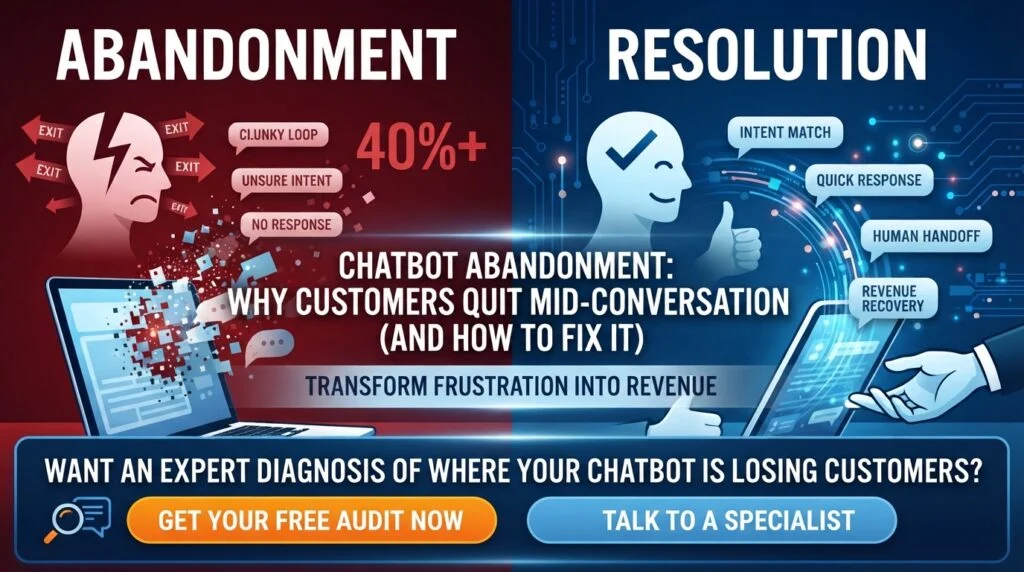
What Is Chatbot Abandonment?
Chatbot abandonment happens when a customer starts a conversation with your chatbot and leaves before their issue is resolved — closing the window, switching to a phone number, or simply walking away frustrated. It’s the conversational equivalent of cart abandonment, except instead of losing a sale at checkout, you lose the customer at the exact moment they raised their hand and asked for help.
The scale of the problem is larger than most businesses realize. Industry diagnostics in 2026 flag an abandonment rate above 40% — meaning more than four in ten users leaving mid-conversation — as a clear signal that a chatbot is actively hurting rather than helping. Meanwhile, roughly 67% of customers report having abandoned a purchase entirely because of a frustrating chatbot experience, and 81% of people who interact with a chatbot go on to try reaching a human agent anyway.
That last statistic is the uncomfortable one: for most businesses, the chatbot isn’t reducing support volume. It’s adding a frustrating layer before the support volume.
Why Does Chatbot Abandonment Matter More Than Deflection Rate?
Most teams measure their chatbot by deflection or containment rate — the percentage of conversations that never reach a human. This is one of the most misleading metrics in customer experience.
A low abandonment rate on a bot that resolves nothing isn’t a success — it means customers politely sat through a useless conversation before being transferred anyway. A bot with a 3% abandonment rate and an 80% transfer rate is, in practical terms, an expensive greeting.
The right way to read the data is always in pairs:
- Abandonment rate alongside resolution rate. High resolution with low abandonment is genuine success. Low abandonment with low resolution means people are tolerating your bot, not being helped by it.
- Containment alongside repeat contact. If customers return within 24 hours with the same issue, that “contained” conversation was a failure that your dashboard recorded as a win.
The 2026 Zendesk CX Trends data reinforces this: when customers ranked what matters most in a support interaction, quick resolution topped the list at 87% — while instant response and 24/7 availability, the two things chatbots are best at, ranked at the very bottom of customer priorities. Speed without resolution is worse than waiting for someone competent.
What Are the Warning Signs Your Chatbot Is Losing Customers?
Before diagnosing causes, confirm you actually have a problem. These are the diagnostic signals that indicate a chatbot is driving customers away rather than serving them:
- Abandonment above 40% — more than four in ten users leaving mid-conversation
- Escalation cascade — over 60% of chatbot interactions ending in a human transfer request
- Repeat contact — customers returning within 24 hours with the identical issue
- Rage clicks — users repeatedly hammering “speak to a human” or similar options
- CSAT collapse — chatbot interaction satisfaction scores falling below 40%
- NPS divergence — customers who interact with your chatbot rating your company 15+ points lower than those who don’t
That final signal is the most damaging, because it means the chatbot isn’t just failing to help — it’s actively degrading how customers feel about your brand overall.
Why Do Customers Quit Chatbots Mid-Conversation?
Chatbot abandonment isn’t one problem. It’s typically five distinct failure points stacked on top of each other, and most teams try to fix all five with a single change.
1. The Bot Doesn’t Understand Intent
The most common failure: a customer asks a question, the bot returns an irrelevant canned response, the customer rephrases, and the bot loops back to the same script. Customers experience this as being trapped in a flow that doesn’t understand what they actually asked.
The research on this is unusually precise. Just 14.9% of users abandon a chatbot after their first “non-progress” turn — but 25.9% abandon after the second consecutive one. Each additional failed exchange sharply compounds the likelihood the customer leaves for good.
The practical takeaway: you get roughly two failed turns before you lose half your recoverable customers. Systems built on exact keyword matching rather than genuine intent recognition burn through those two turns almost immediately.
2. Response Times That Are Still Too Slow
Even an automated system can feel slow. Around 60% of customers will abandon a chat if they don’t receive a response within 60 seconds, and over 50% abandon during extended waiting periods. If your bot hands off to a human queue without a clear wait-time expectation, you’ve converted a chatbot interaction into a hold queue — with all the same abandonment behavior.
3. No Visible Escape Hatch to a Human
Customers who sense the bot can’t help them want out immediately. When there’s no obvious path to a human, they don’t keep trying — they close the window and look for a phone number. Hiding the escalation option to protect your containment rate is one of the most expensive false economies in customer service, because 54% of customers already say chatbot interactions make them feel the company doesn’t value their time.
4. Broken Mobile Experience
Over 60% of e-commerce traffic is mobile in 2026, yet many chatbot widgets are still designed and tested on desktop. If the widget covers half the screen on a phone, or the text input is difficult to tap, you’re hurting conversions rather than helping them — and testing on browser emulators rather than actual devices hides the problem entirely.
5. The Uncanny Valley of Fake Conversation
There’s a psychological dimension that’s easy to dismiss but shows up clearly in the data. Chatbots that almost-but-not-quite understand language create real cognitive friction — they mimic the structure of conversation without the substance, which people find unsettling rather than helpful.
This helps explain why 26% of customers now actively avoid chatbots because of previous bad experiences, and 48% worry about bots misunderstanding their intent before the conversation even starts. You’re often fighting a trust deficit created by someone else’s bad chatbot.
How Do You Diagnose Where Customers Are Actually Dropping Off?
“Our abandonment rate is 12%” tells you something is wrong. It does not tell you whether customers are giving up at the greeting, in a menu, mid-conversation, or during a transfer — and those are four different problems with four different fixes.
Run a structured drop-off analysis instead:
Step 1 — Segment abandonment by conversation stage. Break your abandoned conversations into buckets: abandoned at first message, abandoned after 2–3 turns, abandoned at escalation request, abandoned during human handoff. The shape of this distribution tells you almost everything.
Step 2 — Read the last message before every abandonment. Export the final bot response in abandoned sessions and cluster them. You’ll typically find a small number of specific responses — often fewer than ten — responsible for a disproportionate share of drop-offs.
Step 3 — Identify your non-progress loops. Find conversations where the bot returned functionally the same answer twice. Given that abandonment nearly doubles between the first and second consecutive non-progress turn, these loops are your highest-value fix.
Step 4 — Separate device and channel data. Mobile abandonment patterns differ meaningfully from desktop. Blending them hides UX problems that are specific to small screens.
Step 5 — Cross-reference with repeat contacts. Any “successful” conversation followed by the same customer contacting again within 24 hours should be reclassified as a failure in your reporting.
How Do You Fix Chatbot Abandonment?
Fix 1: Cap Failed Turns, Then Escalate Automatically
Given that abandonment roughly doubles between the first and second consecutive non-progress turn, build a hard rule: after two failed attempts to understand intent, escalate automatically without waiting for the customer to ask. Don’t let the bot try a third time. The third attempt is where you lose them.
Fix 2: Make the Human Handoff Obvious and Always Available
Put a visible, persistent path to a human in the interface from the first message. Counterintuitively, this reduces escalation volume rather than increasing it — customers who know they can escape are far more willing to give the bot a genuine chance to help first.
Fix 3: Build for Intent, Not Keywords
Replace exact-match keyword systems with intent recognition that handles rephrasing, typos, and indirect phrasing. If a customer has to guess your bot’s vocabulary to get an answer, the bot has failed regardless of how good the underlying content library is.
Fix 4: Set Explicit Expectations at Every Transition
Tell customers exactly what’s happening: what the bot can and can’t help with upfront, and precisely how long a human handoff will take. Ambiguous waiting drives abandonment far more than known waiting does.
Fix 5: Design Mobile-First and Test on Real Devices
Test on actual phones, not browser emulators. Check that the widget doesn’t dominate the screen, that the input field is easily tappable, and that the conversation remains readable while the keyboard is open.
Fix 6: Fix Your Top Ten Failure Responses First
Rather than rebuilding your entire flow, identify the specific bot responses that appear most frequently before abandonment and rewrite those first. This is almost always the highest-ROI intervention available, because abandonment tends to concentrate around a small number of recurring dead ends.
Fix 7: Intervene at High-Value Moments, Not Everywhere
On checkout and pricing pages, the cost of abandonment is highest and the fix is most direct. AI chatbots typically reduce cart abandonment by 15–35% depending on implementation quality, and proactive chat invitations at checkout can cut cart abandonment by around 30% — but only when the bot resolves the specific objection (shipping cost, surprise fee, product fit) rather than offering generic help.
Fix 8: Track the Right Metrics From the Start
Stop tracking raw conversation volume. Track cart recovery rate, resolution rate, escalation rate, repeat-contact rate, and abandonment segmented by stage. Without these, you’re flying blind on whether your chatbot is a revenue driver or a leak.
What Does a Healthy Chatbot Benchmark Look Like?
Useful reference points for 2026:
- Abandonment above 40% signals a structurally broken experience requiring redesign, not tuning.
- Escalation above 60% means the bot is functioning as a greeting rather than a resolution tool.
- Under 5% total abandonment is considered strong in contact-center contexts, with 5–8% the widely used target band and above 10% treated as a structural issue.
- Modern AI-enabled centers target under 2% abandonment, compared with 5–8% for human-only operations — but only when paired with genuine resolution rates.
Sales-facing conversations should always be held to a tighter standard than support conversations, because an abandoned sales chat is directly attributable lost revenue rather than a deferred cost.
Is It Ever Better to Remove the Chatbot Entirely?
Sometimes, yes — and honest analysis should allow for that conclusion. If your chatbot produces NPS scores 15+ points lower among customers who use it, drives repeat contacts, and escalates the majority of conversations anyway, it is functioning as a tax on your customers rather than a service.
In those cases, the better short-term move is often to narrow the bot’s scope dramatically: let it handle only the three or four query types it genuinely resolves well, and route everything else straight to a human from the first message. A chatbot that confidently handles 20% of queries well beats one that handles 100% of queries badly — by a very large margin.
Fix Your Chatbot Before It Costs You More Customers
Chatbot abandonment is rarely a technology problem. It’s a design problem — too many failed turns, no escape hatch, poor mobile experience, and metrics that reward containment instead of resolution. Every one of those is fixable, and the fixes usually pay for themselves within a single quarter.
Want an expert diagnosis of where your chatbot is losing customers? Nexstair audits conversational flows, identifies your highest-cost drop-off points, and rebuilds chatbot experiences around resolution — not just deflection.
👉 Get a free chatbot abandonment audit from Nexstair
👉 Talk to Nexstair about rebuilding your AI chat experience
Frequently Asked Questions | Chatbot Abandonment
Q: What is a good chatbot abandonment rate?
A: Under 5% is considered strong, 5–8% is the common target band, and anything above 10% signals a structural problem. Above 40% mid-conversation abandonment indicates a fundamentally broken experience.
Q: Why do customers abandon chatbots mid-conversation?
A: The main causes are the bot failing to understand intent, slow responses, no visible path to a human, broken mobile UX, and repeated non-progress loops that frustrate users after just two failed turns.
Q: How many failed responses does it take before a customer leaves?
A: Research shows 14.9% of users abandon after the first non-progress response, rising to 25.9% after the second consecutive one — so you effectively have two attempts before losses compound sharply.
Q: Does hiding the “talk to a human” button reduce escalations?
A: No. It increases abandonment. Customers who can’t find an escape route close the window entirely rather than continuing with the bot.
Q: Is deflection rate a good way to measure chatbot success?
A: No. Deflection must be read alongside resolution rate and repeat-contact rate. A contained conversation that leads to a repeat contact within 24 hours is a failure recorded as a win.
Q: Can fixing chatbot abandonment improve revenue directly?
A: Yes. Roughly 67% of customers have abandoned a purchase due to a frustrating chatbot experience, and well-implemented chatbots reduce cart abandonment by 15–35%.
 can help you build one that actually fits the way you work.** ## What Technologies Power an AI Virtual Assistant? Here's a quick, scannable summary of the main building blocks: | Technology | What It Does | |---|---| | **Natural Language Processing (NLP)** | Helps the assistant read and interpret human language | | **Natural Language Understanding (NLU)** | Identifies intent and extracts key details from a request | | **Large Language Models (LLMs)** | Generate flexible, human-like responses and handle complex questions | | **Speech Recognition (ASR)** | Converts spoken words into text | | **Text-to-Speech (TTS)** | Converts text responses into natural-sounding speech | | **Machine Learning (ML)** | Helps the system learn patterns and improve over time | | **APIs and Integrations** | Connect the assistant to business tools and data | | **Knowledge Base / Retrieval** | Gives the assistant accurate, up-to-date information to draw from | ## What Are the Different Types of AI Virtual Assistants? Not every virtual assistant works the same way. Here are the main categories. **Rule-based assistants.** These follow pre-written scripts and decision trees. They're predictable and good for simple tasks, but they struggle when customers phrase things unexpectedly. **AI-powered conversational assistants.** These use NLP and machine learning to understand free-form language. They're far more flexible and can handle a wide range of questions. **LLM-powered assistants.** The newest generation uses large language models to hold fluid, natural conversations, summarize information, and reason through multi-part requests. **Voice assistants.** These specialize in spoken interactions, whether on smart speakers, phones, or automated call systems. **Agentic assistants.** An emerging category, these assistants don't just respond; they can plan and carry out multi-step tasks on your behalf, such as researching options, filling out forms, or coordinating across several apps, all within boundaries you define. ## What Is the Difference Between an AI Virtual Assistant and a Chatbot? People often use these terms interchangeably, but there's a useful distinction. A **chatbot** is typically designed for a narrow purpose, usually answering questions or following a set script within a chat window. A **virtual assistant** is generally broader: it understands context, works across multiple channels, connects to several systems, and can complete a wider range of tasks. In practice, the line is blurring. Many modern chatbots are really AI virtual assistants under the hood. The key difference to look for is capability: can it merely respond, or can it understand, remember, and act? ## What Are the Real-World Uses of AI Virtual Assistants? Virtual assistants are showing up in nearly every industry. Here are some of the most common uses. **Customer support.** Answering FAQs, tracking orders, handling returns, and escalating tricky issues to human agents, all around the clock. **E-commerce.** Recommending products, answering sizing and shipping questions, and nudging shoppers who hesitate at checkout. **Healthcare.** Scheduling appointments, sending reminders, and answering basic administrative questions (while leaving medical decisions to professionals). **Banking and finance.** Checking balances, explaining fees, and guiding customers through routine account tasks securely. **Real estate.** Answering listing questions, qualifying leads, and booking property viewings. **Hospitality and travel.** Handling reservations, itinerary questions, and local recommendations. **Human resources.** Answering employee questions about policies, benefits, and time off, and helping with onboarding. **Sales and marketing.** Qualifying leads, capturing contact details, and booking demos for the sales team. ## What Are the Benefits of Using an AI Virtual Assistant? Businesses and individuals adopt virtual assistants for good reasons. - **24/7 availability.** Help is there whenever customers need it, across every time zone. - **Instant responses.** No more waiting in queues or for email replies. - **Cost efficiency.** Handling more conversations without proportionally growing your team. - **Consistency.** The same accurate answer every time, based on your approved information. - **Scalability.** Whether you have ten conversations a day or ten thousand, the assistant keeps up. - **Happier teams.** Employees spend less time on repetitive tasks and more on meaningful work. - **Useful insights.** Conversations reveal what customers really want to know, helping you improve your products, website, and policies. - **More sales.** Quick answers and helpful recommendations remove friction and help customers complete purchases. **Curious how much time and money a virtual assistant could save your business? [nexstairai.com](https://nexstairai.com/) can help you map out the opportunity and get started without the guesswork.** ## What Are the Limitations of AI Virtual Assistants? It's worth being realistic. Even great assistants have limits. - **They can misunderstand.** Unusual phrasing, heavy ambiguity, or very niche topics may trip them up. - **They depend on their information.** If the knowledge base is outdated or incomplete, the answers will be too. - **They can sometimes be wrong.** Language-model-based systems may occasionally produce confident but inaccurate responses, which is why guardrails and good source material matter. - **They lack true human empathy.** They can detect sentiment, but emotionally sensitive situations still benefit from a real person. - **Privacy and security need attention.** Handling personal data responsibly requires proper safeguards and compliance. The good news is that all of these can be managed with thoughtful design: clear boundaries, quality information, regular reviews, and an easy path to a human when needed. ## How Do You Choose the Right AI Virtual Assistant for Your Business? If you're thinking about adopting one, ask yourself these questions. 1. **What problem am I solving?** Support volume, lead capture, scheduling, internal help, or something else? 2. **Which channels do my customers use?** Website, WhatsApp, Instagram, email, phone? 3. **What systems does it need to connect to?** Your CRM, calendar, store, or helpdesk? 4. **How customizable is it?** Can you control tone, workflows, and escalation rules? 5. **How does it handle human handoff?** The transition should be smooth, with full context passed along. 6. **What does security look like?** Look for data protection and compliance with regulations relevant to your customers. 7. **Can I see performance data?** Good analytics help you measure and improve. 8. **What support will I get?** Setup and ongoing optimization make a big difference to results. ## How Do You Get Started With an AI Virtual Assistant? You don't need a massive project to begin. A simple path looks like this: 1. **Identify your top 5 to 10 most common customer questions or tasks.** 2. **Gather accurate, up-to-date information** such as FAQs, policies, and product details. 3. **Choose a platform or partner** that fits your needs and integrates with your tools. 4. **Set up and test** with real-world questions before launching. 5. **Launch on one channel first**, then expand as you gain confidence. 6. **Review conversations regularly**, improving responses and adding new capabilities over time. Starting small and growing steadily is almost always better than trying to automate everything at once. ## What Does the Future Hold for AI Virtual Assistants? The technology is moving quickly. A few trends worth watching: - **More proactive help.** Assistants that reach out with useful information before you ask, such as shipping delays or appointment reminders. - **Greater autonomy.** Agentic assistants that complete multi-step tasks within rules you set. - **Richer personalization.** Better memory of preferences and history, creating more natural, tailored experiences. - **Multimodal interaction.** Assistants that understand text, voice, images, and documents all in one conversation. - **Smoother voice experiences.** Phone and voice interactions that feel increasingly human and natural. - **Stronger safeguards.** Better accuracy controls, privacy protections, and transparency about when you're talking to AI. The businesses that start learning and experimenting now will be best positioned to benefit as these capabilities mature. ## Final Thoughts: Is an AI Virtual Assistant Worth It? An AI virtual assistant is, at its heart, a digital teammate. It listens to what people ask, understands what they mean, finds or does what's needed, and responds in a way that feels natural, all in a matter of seconds and at any hour of the day. Under the hood, it's a clever combination of speech recognition, language understanding, decision-making, integrations, and language generation. But from the customer's point of view, it's simple: they ask, and they get helped. For businesses, the payoff is faster service, lower costs, happier teams, and more room to grow. The key is to start with a clear goal, give your assistant good information, keep humans available for the moments that matter, and keep improving based on real conversations. **Ready to bring an AI virtual assistant into your business? Visit [nexstairai.com](https://nexstairai.com/) to explore how a custom-built assistant can help you serve customers better, save time, and grow with confidence.** --- Want me to write a follow-up next? Good options might be "AI Virtual Assistant vs. Chatbot: What's the Difference?" or "How to Train an AI Virtual Assistant on Your Business Data.](https://nexstairai.com/wp-content/uploads/2026/10/🚀-Supercharge-Your-Business-Growth-with-Nexstair-–-AI-Digital-Marketing-Agency-300x164.jpg.webp)


 can help you build one that actually fits the way you work.** ## What Technologies Power an AI Virtual Assistant? Here's a quick, scannable summary of the main building blocks: | Technology | What It Does | |---|---| | **Natural Language Processing (NLP)** | Helps the assistant read and interpret human language | | **Natural Language Understanding (NLU)** | Identifies intent and extracts key details from a request | | **Large Language Models (LLMs)** | Generate flexible, human-like responses and handle complex questions | | **Speech Recognition (ASR)** | Converts spoken words into text | | **Text-to-Speech (TTS)** | Converts text responses into natural-sounding speech | | **Machine Learning (ML)** | Helps the system learn patterns and improve over time | | **APIs and Integrations** | Connect the assistant to business tools and data | | **Knowledge Base / Retrieval** | Gives the assistant accurate, up-to-date information to draw from | ## What Are the Different Types of AI Virtual Assistants? Not every virtual assistant works the same way. Here are the main categories. **Rule-based assistants.** These follow pre-written scripts and decision trees. They're predictable and good for simple tasks, but they struggle when customers phrase things unexpectedly. **AI-powered conversational assistants.** These use NLP and machine learning to understand free-form language. They're far more flexible and can handle a wide range of questions. **LLM-powered assistants.** The newest generation uses large language models to hold fluid, natural conversations, summarize information, and reason through multi-part requests. **Voice assistants.** These specialize in spoken interactions, whether on smart speakers, phones, or automated call systems. **Agentic assistants.** An emerging category, these assistants don't just respond; they can plan and carry out multi-step tasks on your behalf, such as researching options, filling out forms, or coordinating across several apps, all within boundaries you define. ## What Is the Difference Between an AI Virtual Assistant and a Chatbot? People often use these terms interchangeably, but there's a useful distinction. A **chatbot** is typically designed for a narrow purpose, usually answering questions or following a set script within a chat window. A **virtual assistant** is generally broader: it understands context, works across multiple channels, connects to several systems, and can complete a wider range of tasks. In practice, the line is blurring. Many modern chatbots are really AI virtual assistants under the hood. The key difference to look for is capability: can it merely respond, or can it understand, remember, and act? ## What Are the Real-World Uses of AI Virtual Assistants? Virtual assistants are showing up in nearly every industry. Here are some of the most common uses. **Customer support.** Answering FAQs, tracking orders, handling returns, and escalating tricky issues to human agents, all around the clock. **E-commerce.** Recommending products, answering sizing and shipping questions, and nudging shoppers who hesitate at checkout. **Healthcare.** Scheduling appointments, sending reminders, and answering basic administrative questions (while leaving medical decisions to professionals). **Banking and finance.** Checking balances, explaining fees, and guiding customers through routine account tasks securely. **Real estate.** Answering listing questions, qualifying leads, and booking property viewings. **Hospitality and travel.** Handling reservations, itinerary questions, and local recommendations. **Human resources.** Answering employee questions about policies, benefits, and time off, and helping with onboarding. **Sales and marketing.** Qualifying leads, capturing contact details, and booking demos for the sales team. ## What Are the Benefits of Using an AI Virtual Assistant? Businesses and individuals adopt virtual assistants for good reasons. - **24/7 availability.** Help is there whenever customers need it, across every time zone. - **Instant responses.** No more waiting in queues or for email replies. - **Cost efficiency.** Handling more conversations without proportionally growing your team. - **Consistency.** The same accurate answer every time, based on your approved information. - **Scalability.** Whether you have ten conversations a day or ten thousand, the assistant keeps up. - **Happier teams.** Employees spend less time on repetitive tasks and more on meaningful work. - **Useful insights.** Conversations reveal what customers really want to know, helping you improve your products, website, and policies. - **More sales.** Quick answers and helpful recommendations remove friction and help customers complete purchases. **Curious how much time and money a virtual assistant could save your business? [nexstairai.com](https://nexstairai.com/) can help you map out the opportunity and get started without the guesswork.** ## What Are the Limitations of AI Virtual Assistants? It's worth being realistic. Even great assistants have limits. - **They can misunderstand.** Unusual phrasing, heavy ambiguity, or very niche topics may trip them up. - **They depend on their information.** If the knowledge base is outdated or incomplete, the answers will be too. - **They can sometimes be wrong.** Language-model-based systems may occasionally produce confident but inaccurate responses, which is why guardrails and good source material matter. - **They lack true human empathy.** They can detect sentiment, but emotionally sensitive situations still benefit from a real person. - **Privacy and security need attention.** Handling personal data responsibly requires proper safeguards and compliance. The good news is that all of these can be managed with thoughtful design: clear boundaries, quality information, regular reviews, and an easy path to a human when needed. ## How Do You Choose the Right AI Virtual Assistant for Your Business? If you're thinking about adopting one, ask yourself these questions. 1. **What problem am I solving?** Support volume, lead capture, scheduling, internal help, or something else? 2. **Which channels do my customers use?** Website, WhatsApp, Instagram, email, phone? 3. **What systems does it need to connect to?** Your CRM, calendar, store, or helpdesk? 4. **How customizable is it?** Can you control tone, workflows, and escalation rules? 5. **How does it handle human handoff?** The transition should be smooth, with full context passed along. 6. **What does security look like?** Look for data protection and compliance with regulations relevant to your customers. 7. **Can I see performance data?** Good analytics help you measure and improve. 8. **What support will I get?** Setup and ongoing optimization make a big difference to results. ## How Do You Get Started With an AI Virtual Assistant? You don't need a massive project to begin. A simple path looks like this: 1. **Identify your top 5 to 10 most common customer questions or tasks.** 2. **Gather accurate, up-to-date information** such as FAQs, policies, and product details. 3. **Choose a platform or partner** that fits your needs and integrates with your tools. 4. **Set up and test** with real-world questions before launching. 5. **Launch on one channel first**, then expand as you gain confidence. 6. **Review conversations regularly**, improving responses and adding new capabilities over time. Starting small and growing steadily is almost always better than trying to automate everything at once. ## What Does the Future Hold for AI Virtual Assistants? The technology is moving quickly. A few trends worth watching: - **More proactive help.** Assistants that reach out with useful information before you ask, such as shipping delays or appointment reminders. - **Greater autonomy.** Agentic assistants that complete multi-step tasks within rules you set. - **Richer personalization.** Better memory of preferences and history, creating more natural, tailored experiences. - **Multimodal interaction.** Assistants that understand text, voice, images, and documents all in one conversation. - **Smoother voice experiences.** Phone and voice interactions that feel increasingly human and natural. - **Stronger safeguards.** Better accuracy controls, privacy protections, and transparency about when you're talking to AI. The businesses that start learning and experimenting now will be best positioned to benefit as these capabilities mature. ## Final Thoughts: Is an AI Virtual Assistant Worth It? An AI virtual assistant is, at its heart, a digital teammate. It listens to what people ask, understands what they mean, finds or does what's needed, and responds in a way that feels natural, all in a matter of seconds and at any hour of the day. Under the hood, it's a clever combination of speech recognition, language understanding, decision-making, integrations, and language generation. But from the customer's point of view, it's simple: they ask, and they get helped. For businesses, the payoff is faster service, lower costs, happier teams, and more room to grow. The key is to start with a clear goal, give your assistant good information, keep humans available for the moments that matter, and keep improving based on real conversations. **Ready to bring an AI virtual assistant into your business? Visit [nexstairai.com](https://nexstairai.com/) to explore how a custom-built assistant can help you serve customers better, save time, and grow with confidence.** --- Want me to write a follow-up next? Good options might be "AI Virtual Assistant vs. Chatbot: What's the Difference?" or "How to Train an AI Virtual Assistant on Your Business Data.](https://nexstairai.com/wp-content/uploads/2026/10/🚀-Supercharge-Your-Business-Growth-with-Nexstair-–-AI-Digital-Marketing-Agency-768x419.jpg.webp)