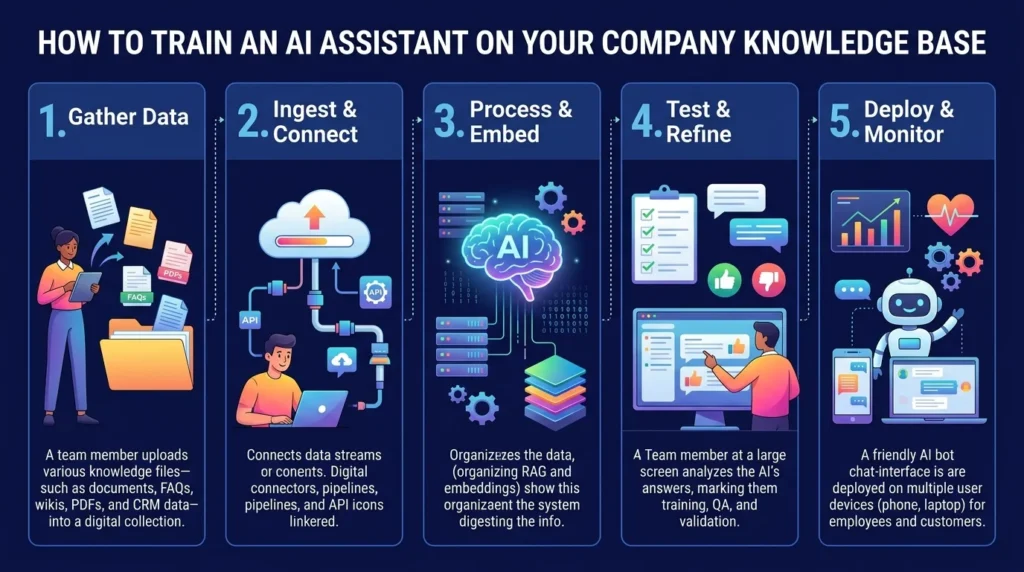
To train an AI assistant on your company data, you don’t retrain the AI model itself. You connect it to a curated set of your own documents, such as help articles, policies, product sheets, and internal guides, so it looks up the relevant passage before it answers. This approach is called grounding, and the most common technique behind it is retrieval-augmented generation (RAG). The quality of the answers depends far more on the quality of your content than on the AI model you choose.
This guide explains what training really means in this context, how the process works, and the steps to follow, from collecting sources to testing and ongoing updates.
What Train an AI Assistant Actually Means
When most businesses say they want to train an AI assistant on their company knowledge base, they picture feeding documents into a model until it memorizes them. That isn’t how it works in most business tools.
A modern AI assistant arrives already knowing a great deal about language and general topics. What it doesn’t know is anything specific to your company: your return policy, your pricing tiers, how your onboarding process runs, or which product comes in which size. Your knowledge base fills that gap. Instead of changing the model, you give it a reliable reference library and teach it to consult that library before it responds.
This distinction matters because it changes where the effort goes. Training an assistant this way is less about technical model settings and more about content operations: deciding what the assistant should know, making sure that information is accurate, and keeping it current.
Grounding vs Fine-Tuning: Which One Do You Need?
Two different methods get called “training,” and mixing them up leads to wasted budget.
| Grounding (RAG) | Fine-Tuning | |
|---|---|---|
| What it does | Retrieves your documents at answer time | Adjusts the model’s internal behavior using example data |
| Best for | Facts, policies, product details, FAQs | Consistent style, format, or specialized task behavior |
| Updating information | Edit or replace a document | Requires another training run |
| Cost and effort | Lower, mostly content work | Higher, needs prepared example data |
| Risk of outdated answers | Low, if documents stay current | Higher, since knowledge is baked in |
For nearly every small and mid-sized business, grounding is the right starting point. Your pricing changes, your policies get revised, and your product range grows. With grounding, you update one document and the assistant reflects the change immediately. Fine-tuning is a later-stage option for teams that need very specific output behavior and have the technical resources to support it.
How Grounding Works in Plain Language
The process behind a grounded assistant follows a simple loop.
First, your documents get split into smaller sections, often called chunks, so each piece covers one idea. Those chunks are then indexed, which means they’re stored in a way that lets the system search them by meaning rather than by exact keywords. When someone asks a question, the system finds the most relevant chunks, passes them to the language model along with the question, and the model writes a natural answer based on that retrieved material.
The practical consequence is straightforward. The assistant can only answer well about topics your knowledge base actually covers. If a policy isn’t documented anywhere, the assistant has nothing reliable to retrieve, and that’s exactly where wrong or invented answers tend to appear.
Step 1: Decide What the Assistant Should Know
Before gathering a single document, define the assistant’s job. An assistant that answers customer support questions needs different knowledge than one that helps new employees find HR policies.
Write down the top questions the assistant should handle. Your support inbox, chat history, and sales call notes are good places to find them. Then sort those questions into three groups: questions with clear factual answers, questions that need judgment, and questions the assistant should never answer on its own, such as legal advice or refund exceptions. Only the first group belongs in your initial knowledge base, and the other two shape your escalation rules later.
A narrow scope beats a broad one. The AI doesn’t need your company’s entire history. It needs the information that supports the specific job you’ve assigned it.
Step 2: Gather and Audit Your Knowledge Sources
Next, collect the material that already contains your answers. Common sources include:
- Help center articles and FAQ pages
- Product manuals, spec sheets, and catalogs
- Policy documents covering returns, shipping, privacy, and warranties
- Internal wikis and standard operating procedures
- Past support tickets with approved answers
- Brand and tone guidelines
Gathering is only half the job. Audit each source before it goes in. Check whether it’s current, whether two documents contradict each other, and whether it’s written clearly enough that a new employee could act on it. A weak knowledge base produces weak AI answers, which can create more support tickets instead of fewer.
Remove duplicates and retire outdated versions. If your website says one thing about delivery times and an old PDF says another, the assistant may retrieve either one. Deciding which source is the single source of truth, then deleting or archiving the rest, prevents contradictory answers before they start.
Step 3: Clean and Structure the Content
AI systems read your content differently from how a person skims it. Clear structure makes retrieval more accurate.
Write each article around a single topic with a descriptive heading, so the system can match it to a question. Put the direct answer near the top, followed by detail and exceptions. Spell out acronyms and internal jargon the first time they appear, since customers won’t use your internal shorthand in their questions.
Question-and-answer pairs are especially useful for your most common queries. Writing out a precise answer to each frequent question, plus a few variations of how customers actually phrase it, gives the assistant a high-accuracy reference for the topics that matter most.
Step 4: Connect Your Sources to the Assistant
With clean content ready, connect it to the assistant. Most platforms offer several routes:
- Document upload: PDFs, Word files, text files, and spreadsheets processed and indexed automatically
- Website crawl: the assistant reads your public pages and extracts topic blocks you can review and edit
- Help center integration: a direct connection to tools like Zendesk, Notion, Intercom, or Freshdesk
- Manual entry: pasted text or Q&A pairs for information that lives nowhere else
A website crawl is the fastest way to get started, but it only covers what’s publicly written. Internal knowledge, like how your team actually handles exceptions, needs to be added through documents or manual entries. Combining a crawl with uploaded documents and a set of Q&A pairs usually gives the broadest coverage.
If your platform lets you set priority levels for sources, give your most authoritative documents the highest priority, such as your official policy pages over older blog posts.
Step 5: Set Boundaries, Tone, and Escalation Rules
Knowledge alone doesn’t make a good assistant. You also need to tell it how to behave.
Define the tone you want, whether that’s formal, friendly, or concise, and give a few example responses so it has a model to follow. Set clear boundaries for topics it should decline, such as medical, legal, or financial advice. Decide what it should say when it doesn’t know an answer. The best instruction is usually simple: if the information isn’t in the knowledge base, say so and offer to connect the person with a human.
Escalation rules matter just as much. Specify when the assistant should hand off to a person, for example when a customer expresses frustration, asks about a refund outside policy, or raises a topic marked sensitive. A smooth handoff protects customer trust far more than a confident but wrong answer does.
Step 6: Test With Real Questions Before Launch
Testing is the step most teams skip or rush, and it’s where most accuracy problems get caught.
Build a test set of 30 to 50 real questions pulled from your actual support history. Include easy questions, tricky ones with multiple parts, questions phrased unusually, and a few the assistant should refuse. Run each one and check the response against your source documents.
Look for patterns in the failures, because each one points to a specific fix:
- Wrong answer from a correct document: the content may be unclear or badly structured
- No answer at all: a knowledge gap, so write the missing document
- Contradictory answers: two sources disagree, so remove one
- Confident answer with no source: tighten the instruction to answer only from the knowledge base
Do this before launch, not after. Fixing problems in a test environment costs nothing, while fixing them after customers have seen wrong answers costs trust.
Step 7: Launch Small, Review Conversations, and Keep Updating
Launch to a limited audience first, such as one channel, one team, or a percentage of website visitors. Real conversations reveal gaps no test set predicts.
Review conversations regularly, especially in the first weeks. Track a few metrics that show how well the knowledge base is working:
- Resolution rate: how many questions the assistant answers without human help
- Escalation rate: how often it passes conversations to a person
- Unanswered questions: topics where it found nothing useful to retrieve
- Feedback ratings: direct signals of which answers helped
The unanswered questions list is the most valuable. It tells you exactly which documents to write next. Treat the knowledge base as a living resource with an owner and a regular review schedule. Whenever a price, policy, or product changes, updating the matching document should be part of that same change.
What to Keep Out of Your Knowledge Base
Not everything in your company belongs in an assistant’s reference library. Before uploading, remove or restrict sensitive material such as personal customer data, payment details, confidential contracts, and internal financial figures.
Access control deserves attention too. An assistant built for customers should only draw on content that’s safe for customers to see, while an internal assistant may use broader material but should respect existing permissions, so an employee can’t retrieve a document they wouldn’t normally have access to. Ask any platform you evaluate how it stores your data, who can see it, and whether your content is used to train models for other customers.
Getting Started
You don’t need a large project to begin. Pick one narrow use case, gather the 20 or so documents that cover it, clean them, connect them, and test with real questions. Expand only after the first version answers reliably.
If you’re exploring this for your business, Nexstair AI’s AI Assistant can be connected to your existing documents and workflows, and the Chatbot page covers how the same approach works on a customer-facing website.
Frequently Asked Questions
What does it mean to train an AI assistant on company data?
It usually means connecting the assistant to your documents so it retrieves relevant information before answering, rather than retraining the underlying model. This method is known as grounding or retrieval-augmented generation (RAG).
Do I need to fine-tune a model to train an AI assistant on my knowledge base?
No. Most businesses get strong results with grounding alone. Fine-tuning changes how a model behaves and is better suited to specialized output styles than to storing company facts.
What documents should I include in an AI knowledge base?
Start with help center articles, FAQs, product documentation, policy documents, and approved answers from past support tickets. Include only content that is accurate, current, and safe for the assistant’s audience to see.
How do I stop an AI assistant from making up answers?
Give it a well-organized knowledge base, instruct it to answer only from that material, and set a fallback for missing information, such as offering a human handoff. Testing with real questions before launch catches most problems early.
How often should I update the knowledge base?
Update it whenever a policy, price, or product changes, and review it on a regular schedule, such as monthly. Reviewing the questions the assistant couldn’t answer shows which content to add.
Is it safe to upload company documents to Train an AI assistant?
It can be, depending on the provider. Remove sensitive personal and financial data first, and ask how the platform stores your content, who can access it, and whether it’s used to train models for other customers.
 can help you build one that actually fits the way you work.** ## What Technologies Power an AI Virtual Assistant? Here's a quick, scannable summary of the main building blocks: | Technology | What It Does | |---|---| | **Natural Language Processing (NLP)** | Helps the assistant read and interpret human language | | **Natural Language Understanding (NLU)** | Identifies intent and extracts key details from a request | | **Large Language Models (LLMs)** | Generate flexible, human-like responses and handle complex questions | | **Speech Recognition (ASR)** | Converts spoken words into text | | **Text-to-Speech (TTS)** | Converts text responses into natural-sounding speech | | **Machine Learning (ML)** | Helps the system learn patterns and improve over time | | **APIs and Integrations** | Connect the assistant to business tools and data | | **Knowledge Base / Retrieval** | Gives the assistant accurate, up-to-date information to draw from | ## What Are the Different Types of AI Virtual Assistants? Not every virtual assistant works the same way. Here are the main categories. **Rule-based assistants.** These follow pre-written scripts and decision trees. They're predictable and good for simple tasks, but they struggle when customers phrase things unexpectedly. **AI-powered conversational assistants.** These use NLP and machine learning to understand free-form language. They're far more flexible and can handle a wide range of questions. **LLM-powered assistants.** The newest generation uses large language models to hold fluid, natural conversations, summarize information, and reason through multi-part requests. **Voice assistants.** These specialize in spoken interactions, whether on smart speakers, phones, or automated call systems. **Agentic assistants.** An emerging category, these assistants don't just respond; they can plan and carry out multi-step tasks on your behalf, such as researching options, filling out forms, or coordinating across several apps, all within boundaries you define. ## What Is the Difference Between an AI Virtual Assistant and a Chatbot? People often use these terms interchangeably, but there's a useful distinction. A **chatbot** is typically designed for a narrow purpose, usually answering questions or following a set script within a chat window. A **virtual assistant** is generally broader: it understands context, works across multiple channels, connects to several systems, and can complete a wider range of tasks. In practice, the line is blurring. Many modern chatbots are really AI virtual assistants under the hood. The key difference to look for is capability: can it merely respond, or can it understand, remember, and act? ## What Are the Real-World Uses of AI Virtual Assistants? Virtual assistants are showing up in nearly every industry. Here are some of the most common uses. **Customer support.** Answering FAQs, tracking orders, handling returns, and escalating tricky issues to human agents, all around the clock. **E-commerce.** Recommending products, answering sizing and shipping questions, and nudging shoppers who hesitate at checkout. **Healthcare.** Scheduling appointments, sending reminders, and answering basic administrative questions (while leaving medical decisions to professionals). **Banking and finance.** Checking balances, explaining fees, and guiding customers through routine account tasks securely. **Real estate.** Answering listing questions, qualifying leads, and booking property viewings. **Hospitality and travel.** Handling reservations, itinerary questions, and local recommendations. **Human resources.** Answering employee questions about policies, benefits, and time off, and helping with onboarding. **Sales and marketing.** Qualifying leads, capturing contact details, and booking demos for the sales team. ## What Are the Benefits of Using an AI Virtual Assistant? Businesses and individuals adopt virtual assistants for good reasons. - **24/7 availability.** Help is there whenever customers need it, across every time zone. - **Instant responses.** No more waiting in queues or for email replies. - **Cost efficiency.** Handling more conversations without proportionally growing your team. - **Consistency.** The same accurate answer every time, based on your approved information. - **Scalability.** Whether you have ten conversations a day or ten thousand, the assistant keeps up. - **Happier teams.** Employees spend less time on repetitive tasks and more on meaningful work. - **Useful insights.** Conversations reveal what customers really want to know, helping you improve your products, website, and policies. - **More sales.** Quick answers and helpful recommendations remove friction and help customers complete purchases. **Curious how much time and money a virtual assistant could save your business? [nexstairai.com](https://nexstairai.com/) can help you map out the opportunity and get started without the guesswork.** ## What Are the Limitations of AI Virtual Assistants? It's worth being realistic. Even great assistants have limits. - **They can misunderstand.** Unusual phrasing, heavy ambiguity, or very niche topics may trip them up. - **They depend on their information.** If the knowledge base is outdated or incomplete, the answers will be too. - **They can sometimes be wrong.** Language-model-based systems may occasionally produce confident but inaccurate responses, which is why guardrails and good source material matter. - **They lack true human empathy.** They can detect sentiment, but emotionally sensitive situations still benefit from a real person. - **Privacy and security need attention.** Handling personal data responsibly requires proper safeguards and compliance. The good news is that all of these can be managed with thoughtful design: clear boundaries, quality information, regular reviews, and an easy path to a human when needed. ## How Do You Choose the Right AI Virtual Assistant for Your Business? If you're thinking about adopting one, ask yourself these questions. 1. **What problem am I solving?** Support volume, lead capture, scheduling, internal help, or something else? 2. **Which channels do my customers use?** Website, WhatsApp, Instagram, email, phone? 3. **What systems does it need to connect to?** Your CRM, calendar, store, or helpdesk? 4. **How customizable is it?** Can you control tone, workflows, and escalation rules? 5. **How does it handle human handoff?** The transition should be smooth, with full context passed along. 6. **What does security look like?** Look for data protection and compliance with regulations relevant to your customers. 7. **Can I see performance data?** Good analytics help you measure and improve. 8. **What support will I get?** Setup and ongoing optimization make a big difference to results. ## How Do You Get Started With an AI Virtual Assistant? You don't need a massive project to begin. A simple path looks like this: 1. **Identify your top 5 to 10 most common customer questions or tasks.** 2. **Gather accurate, up-to-date information** such as FAQs, policies, and product details. 3. **Choose a platform or partner** that fits your needs and integrates with your tools. 4. **Set up and test** with real-world questions before launching. 5. **Launch on one channel first**, then expand as you gain confidence. 6. **Review conversations regularly**, improving responses and adding new capabilities over time. Starting small and growing steadily is almost always better than trying to automate everything at once. ## What Does the Future Hold for AI Virtual Assistants? The technology is moving quickly. A few trends worth watching: - **More proactive help.** Assistants that reach out with useful information before you ask, such as shipping delays or appointment reminders. - **Greater autonomy.** Agentic assistants that complete multi-step tasks within rules you set. - **Richer personalization.** Better memory of preferences and history, creating more natural, tailored experiences. - **Multimodal interaction.** Assistants that understand text, voice, images, and documents all in one conversation. - **Smoother voice experiences.** Phone and voice interactions that feel increasingly human and natural. - **Stronger safeguards.** Better accuracy controls, privacy protections, and transparency about when you're talking to AI. The businesses that start learning and experimenting now will be best positioned to benefit as these capabilities mature. ## Final Thoughts: Is an AI Virtual Assistant Worth It? An AI virtual assistant is, at its heart, a digital teammate. It listens to what people ask, understands what they mean, finds or does what's needed, and responds in a way that feels natural, all in a matter of seconds and at any hour of the day. Under the hood, it's a clever combination of speech recognition, language understanding, decision-making, integrations, and language generation. But from the customer's point of view, it's simple: they ask, and they get helped. For businesses, the payoff is faster service, lower costs, happier teams, and more room to grow. The key is to start with a clear goal, give your assistant good information, keep humans available for the moments that matter, and keep improving based on real conversations. **Ready to bring an AI virtual assistant into your business? Visit [nexstairai.com](https://nexstairai.com/) to explore how a custom-built assistant can help you serve customers better, save time, and grow with confidence.** --- Want me to write a follow-up next? Good options might be "AI Virtual Assistant vs. Chatbot: What's the Difference?" or "How to Train an AI Virtual Assistant on Your Business Data.](https://nexstairai.com/wp-content/uploads/2026/10/🚀-Supercharge-Your-Business-Growth-with-Nexstair-–-AI-Digital-Marketing-Agency-300x164.jpg.webp)

 can help you build one that actually fits the way you work.** ## What Technologies Power an AI Virtual Assistant? Here's a quick, scannable summary of the main building blocks: | Technology | What It Does | |---|---| | **Natural Language Processing (NLP)** | Helps the assistant read and interpret human language | | **Natural Language Understanding (NLU)** | Identifies intent and extracts key details from a request | | **Large Language Models (LLMs)** | Generate flexible, human-like responses and handle complex questions | | **Speech Recognition (ASR)** | Converts spoken words into text | | **Text-to-Speech (TTS)** | Converts text responses into natural-sounding speech | | **Machine Learning (ML)** | Helps the system learn patterns and improve over time | | **APIs and Integrations** | Connect the assistant to business tools and data | | **Knowledge Base / Retrieval** | Gives the assistant accurate, up-to-date information to draw from | ## What Are the Different Types of AI Virtual Assistants? Not every virtual assistant works the same way. Here are the main categories. **Rule-based assistants.** These follow pre-written scripts and decision trees. They're predictable and good for simple tasks, but they struggle when customers phrase things unexpectedly. **AI-powered conversational assistants.** These use NLP and machine learning to understand free-form language. They're far more flexible and can handle a wide range of questions. **LLM-powered assistants.** The newest generation uses large language models to hold fluid, natural conversations, summarize information, and reason through multi-part requests. **Voice assistants.** These specialize in spoken interactions, whether on smart speakers, phones, or automated call systems. **Agentic assistants.** An emerging category, these assistants don't just respond; they can plan and carry out multi-step tasks on your behalf, such as researching options, filling out forms, or coordinating across several apps, all within boundaries you define. ## What Is the Difference Between an AI Virtual Assistant and a Chatbot? People often use these terms interchangeably, but there's a useful distinction. A **chatbot** is typically designed for a narrow purpose, usually answering questions or following a set script within a chat window. A **virtual assistant** is generally broader: it understands context, works across multiple channels, connects to several systems, and can complete a wider range of tasks. In practice, the line is blurring. Many modern chatbots are really AI virtual assistants under the hood. The key difference to look for is capability: can it merely respond, or can it understand, remember, and act? ## What Are the Real-World Uses of AI Virtual Assistants? Virtual assistants are showing up in nearly every industry. Here are some of the most common uses. **Customer support.** Answering FAQs, tracking orders, handling returns, and escalating tricky issues to human agents, all around the clock. **E-commerce.** Recommending products, answering sizing and shipping questions, and nudging shoppers who hesitate at checkout. **Healthcare.** Scheduling appointments, sending reminders, and answering basic administrative questions (while leaving medical decisions to professionals). **Banking and finance.** Checking balances, explaining fees, and guiding customers through routine account tasks securely. **Real estate.** Answering listing questions, qualifying leads, and booking property viewings. **Hospitality and travel.** Handling reservations, itinerary questions, and local recommendations. **Human resources.** Answering employee questions about policies, benefits, and time off, and helping with onboarding. **Sales and marketing.** Qualifying leads, capturing contact details, and booking demos for the sales team. ## What Are the Benefits of Using an AI Virtual Assistant? Businesses and individuals adopt virtual assistants for good reasons. - **24/7 availability.** Help is there whenever customers need it, across every time zone. - **Instant responses.** No more waiting in queues or for email replies. - **Cost efficiency.** Handling more conversations without proportionally growing your team. - **Consistency.** The same accurate answer every time, based on your approved information. - **Scalability.** Whether you have ten conversations a day or ten thousand, the assistant keeps up. - **Happier teams.** Employees spend less time on repetitive tasks and more on meaningful work. - **Useful insights.** Conversations reveal what customers really want to know, helping you improve your products, website, and policies. - **More sales.** Quick answers and helpful recommendations remove friction and help customers complete purchases. **Curious how much time and money a virtual assistant could save your business? [nexstairai.com](https://nexstairai.com/) can help you map out the opportunity and get started without the guesswork.** ## What Are the Limitations of AI Virtual Assistants? It's worth being realistic. Even great assistants have limits. - **They can misunderstand.** Unusual phrasing, heavy ambiguity, or very niche topics may trip them up. - **They depend on their information.** If the knowledge base is outdated or incomplete, the answers will be too. - **They can sometimes be wrong.** Language-model-based systems may occasionally produce confident but inaccurate responses, which is why guardrails and good source material matter. - **They lack true human empathy.** They can detect sentiment, but emotionally sensitive situations still benefit from a real person. - **Privacy and security need attention.** Handling personal data responsibly requires proper safeguards and compliance. The good news is that all of these can be managed with thoughtful design: clear boundaries, quality information, regular reviews, and an easy path to a human when needed. ## How Do You Choose the Right AI Virtual Assistant for Your Business? If you're thinking about adopting one, ask yourself these questions. 1. **What problem am I solving?** Support volume, lead capture, scheduling, internal help, or something else? 2. **Which channels do my customers use?** Website, WhatsApp, Instagram, email, phone? 3. **What systems does it need to connect to?** Your CRM, calendar, store, or helpdesk? 4. **How customizable is it?** Can you control tone, workflows, and escalation rules? 5. **How does it handle human handoff?** The transition should be smooth, with full context passed along. 6. **What does security look like?** Look for data protection and compliance with regulations relevant to your customers. 7. **Can I see performance data?** Good analytics help you measure and improve. 8. **What support will I get?** Setup and ongoing optimization make a big difference to results. ## How Do You Get Started With an AI Virtual Assistant? You don't need a massive project to begin. A simple path looks like this: 1. **Identify your top 5 to 10 most common customer questions or tasks.** 2. **Gather accurate, up-to-date information** such as FAQs, policies, and product details. 3. **Choose a platform or partner** that fits your needs and integrates with your tools. 4. **Set up and test** with real-world questions before launching. 5. **Launch on one channel first**, then expand as you gain confidence. 6. **Review conversations regularly**, improving responses and adding new capabilities over time. Starting small and growing steadily is almost always better than trying to automate everything at once. ## What Does the Future Hold for AI Virtual Assistants? The technology is moving quickly. A few trends worth watching: - **More proactive help.** Assistants that reach out with useful information before you ask, such as shipping delays or appointment reminders. - **Greater autonomy.** Agentic assistants that complete multi-step tasks within rules you set. - **Richer personalization.** Better memory of preferences and history, creating more natural, tailored experiences. - **Multimodal interaction.** Assistants that understand text, voice, images, and documents all in one conversation. - **Smoother voice experiences.** Phone and voice interactions that feel increasingly human and natural. - **Stronger safeguards.** Better accuracy controls, privacy protections, and transparency about when you're talking to AI. The businesses that start learning and experimenting now will be best positioned to benefit as these capabilities mature. ## Final Thoughts: Is an AI Virtual Assistant Worth It? An AI virtual assistant is, at its heart, a digital teammate. It listens to what people ask, understands what they mean, finds or does what's needed, and responds in a way that feels natural, all in a matter of seconds and at any hour of the day. Under the hood, it's a clever combination of speech recognition, language understanding, decision-making, integrations, and language generation. But from the customer's point of view, it's simple: they ask, and they get helped. For businesses, the payoff is faster service, lower costs, happier teams, and more room to grow. The key is to start with a clear goal, give your assistant good information, keep humans available for the moments that matter, and keep improving based on real conversations. **Ready to bring an AI virtual assistant into your business? Visit [nexstairai.com](https://nexstairai.com/) to explore how a custom-built assistant can help you serve customers better, save time, and grow with confidence.** --- Want me to write a follow-up next? Good options might be "AI Virtual Assistant vs. Chatbot: What's the Difference?" or "How to Train an AI Virtual Assistant on Your Business Data.](https://nexstairai.com/wp-content/uploads/2026/10/🚀-Supercharge-Your-Business-Growth-with-Nexstair-–-AI-Digital-Marketing-Agency-768x419.jpg.webp)