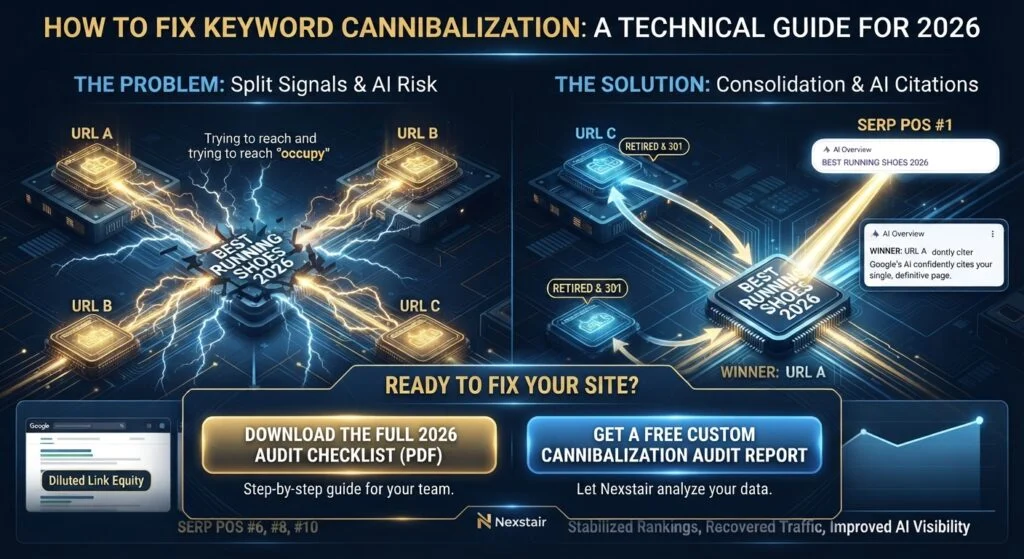
Quick answer: Keyword cannibalization happens when two or more pages on your site compete for the same query and the same search intent, splitting your impressions, links, and click signals so neither page wins. You fix it by diagnosing real overlap in Google Search Console (query + page data), deciding which URL should own the query, then merging, differentiating, redirecting, or canonicalizing, and finally re-pointing your internal links to the winner. Most fixes are a merge plus a 301, not a canonical tag.
Now here’s the part most guides skip: most of what people call cannibalization isn’t. Ahrefs analyzed 9,700 keywords where multiple URLs from the same site ranked, and in their sampled review, only about 1 in 80 actually needed fixing. The rest was diversification working exactly as intended.
That matters, because the wrong fix is often worse than the problem. Plenty of agencies have 301-redirected perfectly healthy blog posts into service pages because a spreadsheet said they “competed,” and lost real informational traffic and backlinks in the process.
So this guide is built around a specific order of operations: diagnose first, decide second, fix third. Let’s get into it.
What Is Keyword Cannibalization in SEO?
Keyword cannibalization is when multiple pages on one domain target the same query and the same underlying intent, forcing search engines to choose between them, and often to rank neither one well.
The mechanical damage happens in four places:
- Split impressions and clicks. Two URLs each collect a share of a query instead of one URL consolidating all of it.
- Diluted link equity. Backlinks that should have strengthened one authoritative page get spread across several weaker ones.
- Unstable rankings. Google keeps swapping which URL it shows, so neither page accumulates consistent engagement signals.
- Weakened topical clarity. When several pages look like the same answer, none of them reads as the definitive answer.
The critical qualifier is intent. Using the same keyword on multiple pages is not automatically a problem. Overlap only becomes cannibalization when the pages serve the same need for the same searcher.
Here’s the distinction in practice:
- “Best running shoes for marathons” and “best running shoes for beginners” may both rank for “best running shoes.” Different intent, different audience. That’s diversification.
- “Best running shoes 2026” and “top running shoes 2026” are the same page wearing two different outfits. That’s cannibalization.
Industry analyses suggest it’s completely normal for a strong site to have several URLs surfacing for a single head keyword. Overlap is the default state of a well-covered topic. Your job isn’t eliminating overlap, it’s finding the overlap that actually costs you traffic.
Is Keyword Cannibalization Real, or Is It an SEO Myth?
It’s real, but it’s badly over-diagnosed. Both things are true at once, which is why the topic generates so much argument.
The myth version is “any two pages ranking for the same keyword is a problem.” That’s demonstrably false, and acting on it destroys traffic. The real version is narrower and more specific: same-query, same-intent, near-duplicate pages that split signals and prevent either page from consolidating authority. That version causes measurable damage, and it’s become more costly in 2026, not less, for reasons we’ll get to in the AI section below.
A useful mental filter before you touch anything: If I showed both pages to a customer, would they see two genuinely different answers, or the same answer written twice? If it’s the same answer twice, you have a real problem. If it’s two different answers, leave it alone and go find something else to fix.
What Causes Keyword Cannibalization?
Cannibalization is almost always an architecture or process problem, not a content-quality problem. The usual sources:
- No keyword map. Multiple writers target the same query over time because nobody documented which page owns what.
- Content refreshes published as new posts. The 2024 version, the 2025 version, and the 2026 version all live at separate URLs and all compete.
- Blog posts colliding with service or product pages. A “what is X” guide and an “X services” page both chase the same commercial-informational middle ground.
- Programmatic or templated pages. Location pages, category pages, and filtered variants that differ by a word or two.
- CMS-generated duplicates. Tag archives, pagination, parameter URLs, and URL aliases that create multiple indexable versions of the same content. This is especially common on WordPress with aggressive tag usage, and on enterprise platforms like Drupal and Sitecore where URL alias management gets messy at scale.
- Migrations done without a redirect audit. Old URLs stay indexed alongside their replacements.
- Overproduction. Publishing volume for its own sake, where the tenth article on a topic is really the third article rewritten.
Newer sites aren’t immune, either. Analyses of young domains find a small but meaningful share of duplicate-keyword overlap right from the start, usually from the tag-archive and content-refresh causes above.
How Does Keyword Cannibalization Affect AI Overviews and ChatGPT Citations?
This is the part that’s genuinely new since 2024, and it’s the strongest argument for cleaning up cannibalization in 2026.
Google has confirmed that AI Overviews and AI Mode use a query fan-out technique: instead of answering your query directly, the system issues multiple related sub-queries across subtopics and data sources, then synthesizes an answer from what it finds. Answer engines like ChatGPT and Perplexity work similarly, and critically, they tend to cite roughly one URL per query or sub-query, not a page of ten blue links.
That changes the stakes. In classic search, cannibalization meant your two pages ranked at #6 and #14 instead of one page at #4, bad, but you still got clicks. In AI-driven search, when the fan-out lands on a domain with several near-duplicate pages, one of two things tends to happen:
- The system clusters your duplicates and represents the whole set with a single URL, which may not be the page you’d have chosen.
- The duplication reads as low confidence, and the system cites a competitor instead, meaning none of your pages get cited.
That second outcome is the expensive one. Practitioners running consolidation projects report that AI Overview citation rates tend to recover within roughly four to eight weeks after cleanup, not days, so this is a fix with a real lag between action and result.
The practical AEO takeaway: answer engines reward a single, clearly-scoped, confidently-written page per question. Cannibalization is the exact opposite signal.
Want to Know Where Your Site Actually Stands?
Finding real cannibalization means looking at your actual query and page data, not guessing from a keyword list. Nexstair’s SEO Audit Report gives you a clear, jargon-free breakdown of what’s working on your site and what’s quietly working against it, so you know exactly which pages to fix first. Run your SEO audit.
How to Fix Keyword Cannibalization? (5 Detection Methods)
Detection is a measurement problem, not a judgment call. Run these in order, cheapest to most involved.
Method 1: The Google Search Console Manual Check
This is the fastest reliable check for a specific keyword:
- Open Performance → Search results.
- Add a Query filter for your exact target keyword (use “Queries containing” or exact match depending on how tightly you want to scope it).
- Switch to the Pages tab.
- If multiple URLs are collecting impressions and clicks for that one query, you have a candidate for overlap, not a confirmed problem.
- Confirm it by comparing two date ranges (two 28-day windows work well) and checking whether those URLs swap positions and split impressions over time.
That swapping behavior is the tell. Stable ownership by one URL with a second URL sitting quietly at position 40 is not the same problem as two URLs trading places at positions 3 and 5.
Method 2: The GSC API for Scale
The dashboard is fine for auditing one keyword. It falls apart when a 500-page site ranks for 20,000 queries.
The Search Console API solves this because it lets you request performance data with both the query and page dimensions together. That returns every unique {query, URL} pair with impressions, clicks, position, and CTR for the period. From there:
- Group rows by query.
- Flag every query returning 2 or more URLs with meaningful impressions.
- Sort by total impressions so you triage by business impact, not alphabetically.
Before you act on the output, filter out the false positives that inflate every raw export: site: and other operator queries, redirect chains, canonical duplicates, hreflang/locale alternates (language versions of one page are not competitors), and long zero-click AI-Mode-style prompts.
Method 3: The site: SERP Check
Search site:yourdomain.com "target keyword" in Google. If multiple pages surface, they’re all potential contenders for that query. This won’t show you position or impressions, but it’s a 10-second way to see what’s actually indexed and overlapping, and it’s useful for spotting tag archives and parameter URLs you forgot existed.
Method 4: Ranking History Analysis
In a tool like Ahrefs or Semrush, pull your domain’s organic keywords, filter to the keyword in question, and open the ranking history. What you’re looking for is the sawtooth pattern: URL A ranks, then URL B, then A again. Consistent URL churn for a single query is one of the clearest confirmations that Google can’t decide which page should own it.
Method 5: Crawl + Semantic Clustering
For a systematic audit, crawl the site with Screaming Frog (or your crawler of choice) and export every indexable URL with its title tag, H1, and meta description. Then cluster by topic and intent rather than exact keyword, since cannibalization frequently hides behind different phrasings of the same question. Pay particular attention to pages whose titles and H1s are near-paraphrases of each other, that’s usually where near-duplicates live.
A manual SERP check belongs at the end of all of this: search the query yourself and look at what Google and the AI Overview actually pick. That tells you what the system currently believes about your site, which no dashboard can.
How Do You Know If It’s Real Cannibalization or Just Normal Overlap?
Not every conflict is worth fixing, and severity varies enormously. Use this triage matrix before choosing a fix:
| Signal | Probably fine (monitor) | Probably real cannibalization (fix) |
|---|---|---|
| Positions | One URL at #3, the other at #35 (second page is effectively invisible) | Both URLs at #3 and #5, splitting clicks almost evenly |
| Intent | Different audiences, funnel stages, or formats (guide vs. product page) | Same question, same audience, same format |
| Ranking history | One URL owns the query consistently | URLs swap repeatedly over weeks |
| Content | Genuinely different angles, examples, and recommendations | Same advice, restructured or re-worded |
| Long-tail spread | Each page ranks for many distinct long-tail variants | Both pages rank for nearly identical variant sets |
| Impression share | Heavily weighted to one URL | Meaningfully split between two or more |
There’s a logic to that “long-tail spread” row worth internalizing: if two pages genuinely serve different intents, they’ll naturally pick up different long-tail variations over time. If they’re pulling nearly identical variant sets, there’s usually more to gain than lose by consolidating them.
One more rule, and it’s the one people ignore most: always read the pages. Never act on keyword overlap data alone. The spreadsheet tells you where to look; only reading the content tells you what to do.
Not Sure Which Pages to Consolidate First?
This is exactly the kind of decision that’s easier with a clear picture of your whole site rather than page-by-page guesswork. Nexstair’s AI Assistant and SEO Audit Report help you prioritize the fixes that will actually move traffic, instead of burning a week on overlap that was never costing you anything. Explore Nexstair AI’s tools.
How Do You Fix Keyword Cannibalization? (The 5 Fixes and When to Use Each)
There are really only five moves. The skill is picking the right one.
Fix 1: Merge and 301 Redirect (the default)
Use when: Two or more pages serve the same intent and neither is clearly differentiated. This is the correct fix in the majority of genuine cases.
How to do it properly:
- Pick the winner on evidence, not preference. Choose the URL with the strongest combination of referring domains, organic visibility across other keywords, historical traffic, and conversion performance. Sometimes the winner is the page you like less, go with the data.
- Migrate the unique value from the losing pages into the winner: sections, examples, data, images, FAQs, anything the winner doesn’t already cover. Don’t just delete and redirect; you’ll lose the reason those pages earned links.
- 301 redirect every retired URL to the winner. A 301 passes the large majority of link equity and ensures anyone landing on old URLs arrives somewhere useful.
- Update internal links. Every internal link pointing at a retired URL should be re-pointed directly at the winner. Leaving them to resolve through redirects wastes crawl efficiency and muddies your internal signal.
- Update your sitemap and resubmit.
- Strengthen the winner’s on-page targeting: one clear primary query in the title tag and H1, with supporting subtopics as H2s.
Fix 2: Differentiate (rewrite and re-target)
Use when: Both pages have real backlinks, real traffic, and genuinely distinct purposes, but you accidentally targeted them at the same query.
This is the most time-intensive fix and often the right one. You’re changing the angle, not deleting the asset: rewrite the title tag, H1, intro, and internal anchors so each page clearly owns a different query and intent. One page goes broad and informational; the other goes specific, commercial, or comparison-focused. Then make the distinction obvious in the content itself, not just the metadata.
Fix 3: Canonicalize
Use when: Content overlap is minimal, both pages need to stay live for users, and you simply need to tell search engines which version is primary. Classic cases: print versions, parameter URLs, and near-identical variants that must exist for functional reasons.
Don’t use it as a shortcut for duplication you haven’t analyzed. A canonical tag is a hint, not a redirect, and if two pages are genuinely too similar, merging or redirecting is the stronger fix. “Slap a canonical on it” is the single most common lazy answer in cannibalization advice, and it frequently leaves the underlying problem in place.
Fix 4: Noindex or Prune
Use when: A page has no meaningful traffic, no links, and no user value, thin tag archives, near-empty category pages, abandoned drafts that got indexed.
Noindex the low-value indexable clutter (tag and archive pages are the usual suspects) and prune the genuinely dead content. But check traffic and backlinks before deleting anything. A page that looks outdated may still be quietly earning links or converting.
Fix 5: Internal Linking Realignment
Use when: You have a clear intended winner but your own internal linking is voting for the other page.
This is the most under-used fix on the list. Point your internal links, especially from high-authority pages and navigation, consistently at the URL you want to own the query, and use descriptive anchor text that matches that page’s target intent. If your site links to Page B with the exact anchor text you want Page A to rank for, you’ve been telling Google to prefer B all along.
What’s the Correct Order of Operations for a Consolidation?
Sequence matters, because doing these steps out of order is how consolidations lose traffic. A safe workflow:
- Snapshot the baseline. Record current impressions, clicks, average position, and conversions for every affected URL, plus referring domains. Without this you can’t prove the fix worked, or catch it if it didn’t.
- Export the content of every page you’re retiring. Save it somewhere retrievable.
- Build the consolidated winner and publish the updated version before removing anything.
- Retire the losers and implement 301s in the same deployment, never a gap where URLs 404.
- Re-point internal links site-wide.
- Update the XML sitemap, remove retired URLs, and resubmit.
- Request indexing for the winner in GSC.
- Fix the redirect chains you created, every hop should be a single 301, not A → B → C.
- Monitor for 4 to 8 weeks, tracking the winner’s consolidated impressions against your baseline, plus AI Overview citations if that’s a channel you care about.
On enterprise CMS platforms, add one step: verify your URL alias and redirect modules are actually handling the redirect at the platform level rather than relying on a plugin that a future deployment might reset.
When Should You Use a Canonical Instead of a 301 Redirect?
Short version: 301 when the page shouldn’t exist anymore; canonical when the page must stay live but shouldn’t be the ranking version.
A 301 removes the URL from the user’s experience entirely and consolidates signals decisively. A canonical keeps the page accessible and asks search engines to attribute ranking signals elsewhere, which is what you want for functional duplicates, paginated variants, syndicated copies, and parameter URLs that real users legitimately land on.
If you find yourself reaching for a canonical because you’re unsure whether the pages are duplicates, that’s the signal to go read the pages, not to hedge with a tag.
How Long Does It Take to Recover After Fixing Cannibalization?
Expect weeks, not days. Google has to recrawl, process the redirects, and re-consolidate signals to the winner. A realistic timeline:
- Days 1–7: Recrawling and redirect processing. Ranking volatility is normal and expected here, don’t panic and revert.
- Weeks 2–4: Consolidated impressions typically begin showing on the winner. Position should start stabilizing rather than swapping.
- Weeks 4–8: AI Overview and answer-engine citation recovery, when it happens, generally lands in this window.
- Beyond 8 weeks: If the winner hasn’t consolidated by now, re-examine your diagnosis. The most common cause of a failed consolidation is that the pages weren’t actually cannibalizing, or that internal links are still voting for a retired URL.
How Do You Prevent Keyword Cannibalization Going Forward?
Prevention is dramatically cheaper than consolidation. Four things do most of the work:
- Maintain a keyword map. One document, one row per page, one primary query per page. Every new brief gets checked against it before anyone writes a word. This single artifact prevents most cannibalization.
- Build topic clusters, not piles of posts. One pillar page owning the head term, supporting pages owning distinct long-tail subtopics, all interlinked with intent-matched anchors. Clusters are the most reliable structural defense against overlap.
- Update, don’t republish. When content needs refreshing, update the existing URL. Don’t create “2026 edition” at a new URL while the old one stays indexed.
- Add a pre-publish check. Before publishing, run the
site:check and a GSC query filter for the target keyword. If a page already owns it, you’re writing an update, not a new post.
Then re-audit on a cadence, quarterly for most sites, monthly for anything publishing at volume or running programmatic pages. It’s also worth adding a cannibalization check to your post-migration checklist, since migrations are one of the most reliable ways to accidentally create competing indexed URLs.
What Mistakes Should You Avoid When Fixing Cannibalization?
- Deleting pages based on keyword overlap data alone. Read the pages first, every time.
- Deleting content that looks outdated but still earns links or traffic. Check the data before you prune.
- Using canonicals as a substitute for analysis. They’re the right fix for a narrow set of cases, not a catch-all.
- Forgetting internal links. A consolidation with stale internal links pointing at retired URLs is a half-finished consolidation.
- Redirecting informational content into commercial pages. You’ll usually lose the informational traffic and the backlinks that came with it, which is a bad trade.
- Creating redirect chains. Always redirect to the final destination in one hop.
- Reverting after one week of volatility. Short-term fluctuation during recrawling is expected. Give it the full window.
Frequently Asked Questions | How to Fix Keyword Cannibalization
Does keyword cannibalization cause a Google penalty?
No. There’s no penalty for it. The damage is mechanical, split signals, diluted link equity, and unstable rankings, not punitive.
Can two pages rank for the same keyword without it being cannibalization?
Yes, and it’s extremely common. If the pages serve different intents and each picks up distinct long-tail variants, that’s healthy diversification, not a problem to fix.
Does keyword cannibalization affect ChatGPT and AI Overview citations?
Yes. Answer engines cite roughly one URL per query or sub-query. Competing near-duplicates on your domain can get clustered into a single representation, or read as low confidence, which can mean none of your pages get cited at all.
Should I use a canonical tag or a 301 redirect to fix cannibalization?
Use a 301 when the page no longer needs to exist and you want signals consolidated decisively. Use a canonical when the page must stay accessible to users but shouldn’t be the ranking version.
How do I find cannibalization in Google Search Console?
Filter the Performance report by your exact target query, open the Pages tab, and check whether multiple URLs are collecting impressions. Then compare two date ranges to see whether those URLs swap positions and split impressions over time. For site-wide auditing, pull the same data via the GSC API using the query and page dimensions together.
How long does recovery take after consolidating pages?
Typically two to eight weeks, with early ranking volatility in the first week and AI citation recovery, when it occurs, usually landing in the four-to-eight-week range.
Can internal linking alone fix cannibalization?
Sometimes, yes. If you have a clear intended winner but your internal links and anchor text point at a competing page, realigning them can resolve the conflict without deleting or redirecting anything.
The Bottom Line | How to Fix Keyword Cannibalization
Keyword cannibalization is real, over-diagnosed, and more consequential in 2026 than it was two years ago, because answer engines pick one URL per query and near-duplicates can cost you the citation entirely.
The discipline that actually works: diagnose with real query-and-page data, distinguish same-intent overlap from healthy diversification, choose the fix that matches the situation rather than defaulting to a canonical tag, and finish the job by re-pointing your internal links. Then leave it alone for six weeks and read the data instead of your nerves.
If you’d rather start with a clear picture of where your site actually stands, get started with Nexstair AI today and let an audit surface the overlap that’s costing you traffic before you start moving pages around.

 can help you build one that actually fits the way you work.** ## What Technologies Power an AI Virtual Assistant? Here's a quick, scannable summary of the main building blocks: | Technology | What It Does | |---|---| | **Natural Language Processing (NLP)** | Helps the assistant read and interpret human language | | **Natural Language Understanding (NLU)** | Identifies intent and extracts key details from a request | | **Large Language Models (LLMs)** | Generate flexible, human-like responses and handle complex questions | | **Speech Recognition (ASR)** | Converts spoken words into text | | **Text-to-Speech (TTS)** | Converts text responses into natural-sounding speech | | **Machine Learning (ML)** | Helps the system learn patterns and improve over time | | **APIs and Integrations** | Connect the assistant to business tools and data | | **Knowledge Base / Retrieval** | Gives the assistant accurate, up-to-date information to draw from | ## What Are the Different Types of AI Virtual Assistants? Not every virtual assistant works the same way. Here are the main categories. **Rule-based assistants.** These follow pre-written scripts and decision trees. They're predictable and good for simple tasks, but they struggle when customers phrase things unexpectedly. **AI-powered conversational assistants.** These use NLP and machine learning to understand free-form language. They're far more flexible and can handle a wide range of questions. **LLM-powered assistants.** The newest generation uses large language models to hold fluid, natural conversations, summarize information, and reason through multi-part requests. **Voice assistants.** These specialize in spoken interactions, whether on smart speakers, phones, or automated call systems. **Agentic assistants.** An emerging category, these assistants don't just respond; they can plan and carry out multi-step tasks on your behalf, such as researching options, filling out forms, or coordinating across several apps, all within boundaries you define. ## What Is the Difference Between an AI Virtual Assistant and a Chatbot? People often use these terms interchangeably, but there's a useful distinction. A **chatbot** is typically designed for a narrow purpose, usually answering questions or following a set script within a chat window. A **virtual assistant** is generally broader: it understands context, works across multiple channels, connects to several systems, and can complete a wider range of tasks. In practice, the line is blurring. Many modern chatbots are really AI virtual assistants under the hood. The key difference to look for is capability: can it merely respond, or can it understand, remember, and act? ## What Are the Real-World Uses of AI Virtual Assistants? Virtual assistants are showing up in nearly every industry. Here are some of the most common uses. **Customer support.** Answering FAQs, tracking orders, handling returns, and escalating tricky issues to human agents, all around the clock. **E-commerce.** Recommending products, answering sizing and shipping questions, and nudging shoppers who hesitate at checkout. **Healthcare.** Scheduling appointments, sending reminders, and answering basic administrative questions (while leaving medical decisions to professionals). **Banking and finance.** Checking balances, explaining fees, and guiding customers through routine account tasks securely. **Real estate.** Answering listing questions, qualifying leads, and booking property viewings. **Hospitality and travel.** Handling reservations, itinerary questions, and local recommendations. **Human resources.** Answering employee questions about policies, benefits, and time off, and helping with onboarding. **Sales and marketing.** Qualifying leads, capturing contact details, and booking demos for the sales team. ## What Are the Benefits of Using an AI Virtual Assistant? Businesses and individuals adopt virtual assistants for good reasons. - **24/7 availability.** Help is there whenever customers need it, across every time zone. - **Instant responses.** No more waiting in queues or for email replies. - **Cost efficiency.** Handling more conversations without proportionally growing your team. - **Consistency.** The same accurate answer every time, based on your approved information. - **Scalability.** Whether you have ten conversations a day or ten thousand, the assistant keeps up. - **Happier teams.** Employees spend less time on repetitive tasks and more on meaningful work. - **Useful insights.** Conversations reveal what customers really want to know, helping you improve your products, website, and policies. - **More sales.** Quick answers and helpful recommendations remove friction and help customers complete purchases. **Curious how much time and money a virtual assistant could save your business? [nexstairai.com](https://nexstairai.com/) can help you map out the opportunity and get started without the guesswork.** ## What Are the Limitations of AI Virtual Assistants? It's worth being realistic. Even great assistants have limits. - **They can misunderstand.** Unusual phrasing, heavy ambiguity, or very niche topics may trip them up. - **They depend on their information.** If the knowledge base is outdated or incomplete, the answers will be too. - **They can sometimes be wrong.** Language-model-based systems may occasionally produce confident but inaccurate responses, which is why guardrails and good source material matter. - **They lack true human empathy.** They can detect sentiment, but emotionally sensitive situations still benefit from a real person. - **Privacy and security need attention.** Handling personal data responsibly requires proper safeguards and compliance. The good news is that all of these can be managed with thoughtful design: clear boundaries, quality information, regular reviews, and an easy path to a human when needed. ## How Do You Choose the Right AI Virtual Assistant for Your Business? If you're thinking about adopting one, ask yourself these questions. 1. **What problem am I solving?** Support volume, lead capture, scheduling, internal help, or something else? 2. **Which channels do my customers use?** Website, WhatsApp, Instagram, email, phone? 3. **What systems does it need to connect to?** Your CRM, calendar, store, or helpdesk? 4. **How customizable is it?** Can you control tone, workflows, and escalation rules? 5. **How does it handle human handoff?** The transition should be smooth, with full context passed along. 6. **What does security look like?** Look for data protection and compliance with regulations relevant to your customers. 7. **Can I see performance data?** Good analytics help you measure and improve. 8. **What support will I get?** Setup and ongoing optimization make a big difference to results. ## How Do You Get Started With an AI Virtual Assistant? You don't need a massive project to begin. A simple path looks like this: 1. **Identify your top 5 to 10 most common customer questions or tasks.** 2. **Gather accurate, up-to-date information** such as FAQs, policies, and product details. 3. **Choose a platform or partner** that fits your needs and integrates with your tools. 4. **Set up and test** with real-world questions before launching. 5. **Launch on one channel first**, then expand as you gain confidence. 6. **Review conversations regularly**, improving responses and adding new capabilities over time. Starting small and growing steadily is almost always better than trying to automate everything at once. ## What Does the Future Hold for AI Virtual Assistants? The technology is moving quickly. A few trends worth watching: - **More proactive help.** Assistants that reach out with useful information before you ask, such as shipping delays or appointment reminders. - **Greater autonomy.** Agentic assistants that complete multi-step tasks within rules you set. - **Richer personalization.** Better memory of preferences and history, creating more natural, tailored experiences. - **Multimodal interaction.** Assistants that understand text, voice, images, and documents all in one conversation. - **Smoother voice experiences.** Phone and voice interactions that feel increasingly human and natural. - **Stronger safeguards.** Better accuracy controls, privacy protections, and transparency about when you're talking to AI. The businesses that start learning and experimenting now will be best positioned to benefit as these capabilities mature. ## Final Thoughts: Is an AI Virtual Assistant Worth It? An AI virtual assistant is, at its heart, a digital teammate. It listens to what people ask, understands what they mean, finds or does what's needed, and responds in a way that feels natural, all in a matter of seconds and at any hour of the day. Under the hood, it's a clever combination of speech recognition, language understanding, decision-making, integrations, and language generation. But from the customer's point of view, it's simple: they ask, and they get helped. For businesses, the payoff is faster service, lower costs, happier teams, and more room to grow. The key is to start with a clear goal, give your assistant good information, keep humans available for the moments that matter, and keep improving based on real conversations. **Ready to bring an AI virtual assistant into your business? Visit [nexstairai.com](https://nexstairai.com/) to explore how a custom-built assistant can help you serve customers better, save time, and grow with confidence.** --- Want me to write a follow-up next? Good options might be "AI Virtual Assistant vs. Chatbot: What's the Difference?" or "How to Train an AI Virtual Assistant on Your Business Data.](https://nexstairai.com/wp-content/uploads/2026/10/🚀-Supercharge-Your-Business-Growth-with-Nexstair-–-AI-Digital-Marketing-Agency-300x164.jpg.webp)
 can help you build one that actually fits the way you work.** ## What Technologies Power an AI Virtual Assistant? Here's a quick, scannable summary of the main building blocks: | Technology | What It Does | |---|---| | **Natural Language Processing (NLP)** | Helps the assistant read and interpret human language | | **Natural Language Understanding (NLU)** | Identifies intent and extracts key details from a request | | **Large Language Models (LLMs)** | Generate flexible, human-like responses and handle complex questions | | **Speech Recognition (ASR)** | Converts spoken words into text | | **Text-to-Speech (TTS)** | Converts text responses into natural-sounding speech | | **Machine Learning (ML)** | Helps the system learn patterns and improve over time | | **APIs and Integrations** | Connect the assistant to business tools and data | | **Knowledge Base / Retrieval** | Gives the assistant accurate, up-to-date information to draw from | ## What Are the Different Types of AI Virtual Assistants? Not every virtual assistant works the same way. Here are the main categories. **Rule-based assistants.** These follow pre-written scripts and decision trees. They're predictable and good for simple tasks, but they struggle when customers phrase things unexpectedly. **AI-powered conversational assistants.** These use NLP and machine learning to understand free-form language. They're far more flexible and can handle a wide range of questions. **LLM-powered assistants.** The newest generation uses large language models to hold fluid, natural conversations, summarize information, and reason through multi-part requests. **Voice assistants.** These specialize in spoken interactions, whether on smart speakers, phones, or automated call systems. **Agentic assistants.** An emerging category, these assistants don't just respond; they can plan and carry out multi-step tasks on your behalf, such as researching options, filling out forms, or coordinating across several apps, all within boundaries you define. ## What Is the Difference Between an AI Virtual Assistant and a Chatbot? People often use these terms interchangeably, but there's a useful distinction. A **chatbot** is typically designed for a narrow purpose, usually answering questions or following a set script within a chat window. A **virtual assistant** is generally broader: it understands context, works across multiple channels, connects to several systems, and can complete a wider range of tasks. In practice, the line is blurring. Many modern chatbots are really AI virtual assistants under the hood. The key difference to look for is capability: can it merely respond, or can it understand, remember, and act? ## What Are the Real-World Uses of AI Virtual Assistants? Virtual assistants are showing up in nearly every industry. Here are some of the most common uses. **Customer support.** Answering FAQs, tracking orders, handling returns, and escalating tricky issues to human agents, all around the clock. **E-commerce.** Recommending products, answering sizing and shipping questions, and nudging shoppers who hesitate at checkout. **Healthcare.** Scheduling appointments, sending reminders, and answering basic administrative questions (while leaving medical decisions to professionals). **Banking and finance.** Checking balances, explaining fees, and guiding customers through routine account tasks securely. **Real estate.** Answering listing questions, qualifying leads, and booking property viewings. **Hospitality and travel.** Handling reservations, itinerary questions, and local recommendations. **Human resources.** Answering employee questions about policies, benefits, and time off, and helping with onboarding. **Sales and marketing.** Qualifying leads, capturing contact details, and booking demos for the sales team. ## What Are the Benefits of Using an AI Virtual Assistant? Businesses and individuals adopt virtual assistants for good reasons. - **24/7 availability.** Help is there whenever customers need it, across every time zone. - **Instant responses.** No more waiting in queues or for email replies. - **Cost efficiency.** Handling more conversations without proportionally growing your team. - **Consistency.** The same accurate answer every time, based on your approved information. - **Scalability.** Whether you have ten conversations a day or ten thousand, the assistant keeps up. - **Happier teams.** Employees spend less time on repetitive tasks and more on meaningful work. - **Useful insights.** Conversations reveal what customers really want to know, helping you improve your products, website, and policies. - **More sales.** Quick answers and helpful recommendations remove friction and help customers complete purchases. **Curious how much time and money a virtual assistant could save your business? [nexstairai.com](https://nexstairai.com/) can help you map out the opportunity and get started without the guesswork.** ## What Are the Limitations of AI Virtual Assistants? It's worth being realistic. Even great assistants have limits. - **They can misunderstand.** Unusual phrasing, heavy ambiguity, or very niche topics may trip them up. - **They depend on their information.** If the knowledge base is outdated or incomplete, the answers will be too. - **They can sometimes be wrong.** Language-model-based systems may occasionally produce confident but inaccurate responses, which is why guardrails and good source material matter. - **They lack true human empathy.** They can detect sentiment, but emotionally sensitive situations still benefit from a real person. - **Privacy and security need attention.** Handling personal data responsibly requires proper safeguards and compliance. The good news is that all of these can be managed with thoughtful design: clear boundaries, quality information, regular reviews, and an easy path to a human when needed. ## How Do You Choose the Right AI Virtual Assistant for Your Business? If you're thinking about adopting one, ask yourself these questions. 1. **What problem am I solving?** Support volume, lead capture, scheduling, internal help, or something else? 2. **Which channels do my customers use?** Website, WhatsApp, Instagram, email, phone? 3. **What systems does it need to connect to?** Your CRM, calendar, store, or helpdesk? 4. **How customizable is it?** Can you control tone, workflows, and escalation rules? 5. **How does it handle human handoff?** The transition should be smooth, with full context passed along. 6. **What does security look like?** Look for data protection and compliance with regulations relevant to your customers. 7. **Can I see performance data?** Good analytics help you measure and improve. 8. **What support will I get?** Setup and ongoing optimization make a big difference to results. ## How Do You Get Started With an AI Virtual Assistant? You don't need a massive project to begin. A simple path looks like this: 1. **Identify your top 5 to 10 most common customer questions or tasks.** 2. **Gather accurate, up-to-date information** such as FAQs, policies, and product details. 3. **Choose a platform or partner** that fits your needs and integrates with your tools. 4. **Set up and test** with real-world questions before launching. 5. **Launch on one channel first**, then expand as you gain confidence. 6. **Review conversations regularly**, improving responses and adding new capabilities over time. Starting small and growing steadily is almost always better than trying to automate everything at once. ## What Does the Future Hold for AI Virtual Assistants? The technology is moving quickly. A few trends worth watching: - **More proactive help.** Assistants that reach out with useful information before you ask, such as shipping delays or appointment reminders. - **Greater autonomy.** Agentic assistants that complete multi-step tasks within rules you set. - **Richer personalization.** Better memory of preferences and history, creating more natural, tailored experiences. - **Multimodal interaction.** Assistants that understand text, voice, images, and documents all in one conversation. - **Smoother voice experiences.** Phone and voice interactions that feel increasingly human and natural. - **Stronger safeguards.** Better accuracy controls, privacy protections, and transparency about when you're talking to AI. The businesses that start learning and experimenting now will be best positioned to benefit as these capabilities mature. ## Final Thoughts: Is an AI Virtual Assistant Worth It? An AI virtual assistant is, at its heart, a digital teammate. It listens to what people ask, understands what they mean, finds or does what's needed, and responds in a way that feels natural, all in a matter of seconds and at any hour of the day. Under the hood, it's a clever combination of speech recognition, language understanding, decision-making, integrations, and language generation. But from the customer's point of view, it's simple: they ask, and they get helped. For businesses, the payoff is faster service, lower costs, happier teams, and more room to grow. The key is to start with a clear goal, give your assistant good information, keep humans available for the moments that matter, and keep improving based on real conversations. **Ready to bring an AI virtual assistant into your business? Visit [nexstairai.com](https://nexstairai.com/) to explore how a custom-built assistant can help you serve customers better, save time, and grow with confidence.** --- Want me to write a follow-up next? Good options might be "AI Virtual Assistant vs. Chatbot: What's the Difference?" or "How to Train an AI Virtual Assistant on Your Business Data.](https://nexstairai.com/wp-content/uploads/2026/10/🚀-Supercharge-Your-Business-Growth-with-Nexstair-–-AI-Digital-Marketing-Agency-768x419.jpg.webp)