Implementing an AI chatbot on your business website can make it easier for visitors to find information, get answers to common questions, and connect with your business without waiting for a support representative. Instead of relying entirely on manual customer interactions, businesses can use AI chatbots to handle routine conversations, qualify leads, and provide assistance around the clock.
However, successful AI chatbot implementation involves more than adding a chat widget to your website. You need to identify the right use cases, select an appropriate chatbot platform, prepare business information, configure integrations, and test the chatbot before making it available to visitors.
Whether you operate a small business website, an ecommerce store, or a service-based company, this guide explains how to implement an AI chatbot on your website and build a useful experience for your customers.
What Is AI Chatbot Implementation?
AI chatbot implementation is the process of integrating an artificial intelligence-powered conversational system into a business website to communicate with visitors and assist them with different tasks.
Unlike traditional rule-based chatbots that follow predefined scripts, AI chatbots can interpret natural language, understand customer questions, and generate relevant responses using their configured knowledge sources.
Depending on the business requirements, an AI chatbot can:
- Answer frequently asked questions about products and services.
- Collect visitor information and generate leads.
- Recommend relevant products or services.
- Help customers navigate website content.
- Provide information about orders, bookings, and business policies.
- Connect visitors with human support representatives.
- Assist potential customers outside regular business hours.
For a better understanding of the capabilities businesses should consider, explore our guide to AI chatbot features for businesses.
Why Should Businesses Add an AI Chatbot to Their Websites?
Before implementing a chatbot, businesses should understand what problems it is expected to solve. A well-configured chatbot can support customer service, improve website engagement, and make lead collection more efficient.
1. Provide 24/7 Customer Support
Website visitors do not always arrive during business hours. When customers have questions at night, during weekends, or on holidays, they may leave without finding the information they need.
An AI chatbot can provide automated assistance at any time by answering questions using approved business information.
This allows businesses to handle routine inquiries without requiring a support representative to be available for every conversation.
Businesses can also explore how to automate customer support with AI to understand how AI-powered systems can reduce repetitive support tasks.
2. Generate and Qualify More Leads
An AI chatbot can engage website visitors who are interested in a company's products or services.
It can ask relevant questions about their requirements, identify their interests, and collect contact information when appropriate.
For example, a digital marketing agency can configure its chatbot to ask visitors about their business type, marketing goals, website URL, and required services before directing qualified inquiries to its sales team.
3. Reduce Repetitive Customer Service Tasks
Customer support teams often spend significant time answering similar questions about pricing, services, availability, delivery, and company policies.
An AI chatbot can handle many routine inquiries automatically, allowing employees to focus on complex customer problems that require personal attention.
4. Improve Website User Experience
Visitors may struggle to find specific information on websites with multiple service pages, product categories, or resources.
An AI chatbot can guide users toward relevant pages and help them understand which products or services match their requirements.
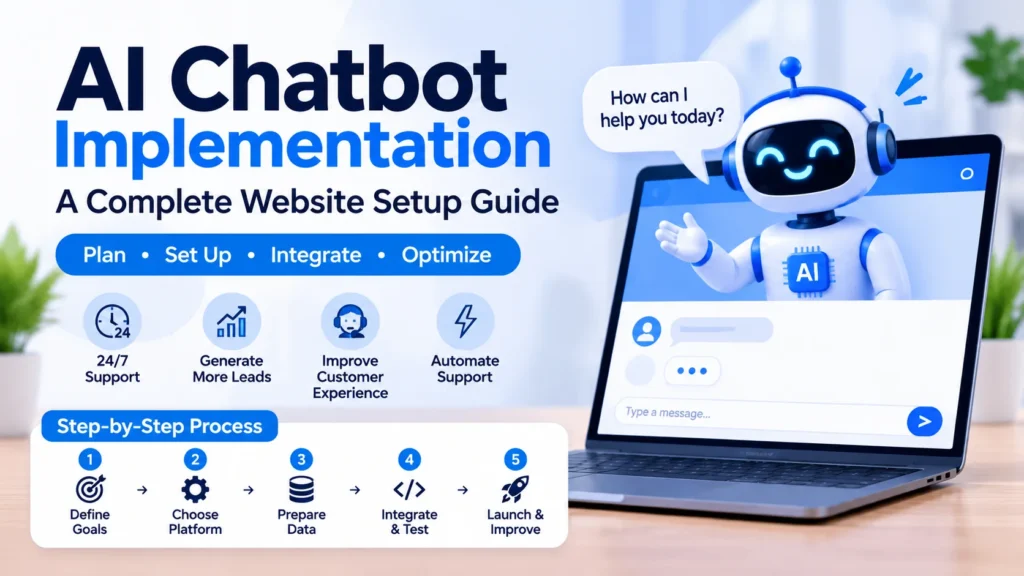
7 Steps to Implement an AI Chatbot on Your Business Website
Successful implementation requires a clear plan. Follow these steps to introduce an AI chatbot that supports your business operations and customer experience.
Step 1: Identify Your Business Goals and Chatbot Requirements
The first step is deciding what you want your AI chatbot to accomplish.
Avoid creating a chatbot simply because AI technology is becoming popular. Instead, identify the specific customer problems or operational tasks that the chatbot should address.
Start by reviewing your existing customer interactions and identifying frequently repeated questions.
Consider these common chatbot use cases:
- Customer support: Answer common questions about products, services, and policies.
- Lead generation: Collect visitor information and identify potential customers.
- Sales assistance: Help visitors understand products and compare available options.
- Appointment scheduling: Collect booking preferences and connect visitors with scheduling systems.
- Technical assistance: Guide customers through basic troubleshooting steps.
Choose one primary objective for your initial chatbot implementation. You can introduce additional capabilities after evaluating its performance.
For example, a small business may initially implement a chatbot to answer service-related questions and collect consultation requests. Once the system works reliably, the business can connect it to its CRM or appointment scheduling platform.
Step 2: Choose the Right AI Chatbot Platform
After defining your requirements, select an AI chatbot platform that supports your website technology and business needs.
Different platforms offer different levels of customization, integration capabilities, and automation features.
Here are some common options businesses can consider:
No-Code AI Chatbot Platforms
No-code platforms allow businesses to create and deploy chatbots without extensive programming knowledge. They typically provide visual builders, knowledge-base connections, and website embedding options.
These solutions are useful for small businesses that want to launch a chatbot quickly.
AI Chatbot Builders
Dedicated chatbot builders offer more control over conversation design, knowledge sources, integrations, and chatbot behavior.
They can be suitable for businesses that need customized customer support or lead generation workflows.
Custom AI Chatbot Development
Businesses with specific technical requirements may choose custom chatbot development using AI APIs, backend systems, and website integrations.
A custom solution provides greater control over functionality, security, data access, and user experience. However, it generally requires development resources and ongoing technical maintenance.
When comparing platforms, evaluate:
- Website compatibility.
- Knowledge-base and document support.
- CRM and third-party integrations.
- Customization options.
- Data protection and security controls.
- Human support handoff.
- Usage limits and pricing.
- Analytics and conversation reporting.
The right platform should match your actual requirements rather than simply offering the largest number of features.
Step 3: Prepare Your Business Information and Knowledge Base
Your chatbot needs reliable information to answer customer questions accurately.
A knowledge base is a collection of approved business information that an AI chatbot can reference when responding to visitors.
Before connecting your chatbot, organize relevant information from your website and internal business resources.
Useful knowledge sources include:
- Website service and product pages.
- Frequently asked questions.
- Company information and business policies.
- Product descriptions and documentation.
- Shipping, delivery, and return policies.
- Pricing information approved for customer communication.
- Customer support guides.
Make sure the information is accurate, organized, and updated.
For example, if your website offers several services, create clear descriptions explaining what each service includes, who it is suitable for, and how customers can request it.
You should also identify information that the chatbot must not disclose, such as confidential company documents, internal employee information, or private customer records.
If you want to understand how to prepare and connect company information to an AI system, read our guide on training an AI assistant on company data.
Why does knowledge-base quality matter?
An AI chatbot may generate inaccurate or incomplete responses when its information sources are outdated, unclear, or inconsistent.
Providing well-organized knowledge sources helps the chatbot retrieve relevant information and deliver more useful responses.
For websites with extensive documentation, retrieval-augmented generation (RAG) can help the chatbot find relevant information from approved sources before generating an answer.
Step 4: Configure the Chatbot's Instructions and Conversation Flow
Once your knowledge base is ready, configure how the chatbot should communicate with visitors.
Your chatbot needs clear instructions about its role, responsibilities, communication style, and limitations.
For example, a business website chatbot might follow these instructions:
- Introduce itself as the company's AI assistant.
- Use a professional and friendly communication style.
- Answer questions using approved business information.
- Keep responses clear and relevant.
- Ask follow-up questions when customer requirements are unclear.
- Avoid inventing prices, policies, or service details.
- Offer human assistance when it cannot resolve an inquiry.
You should also design conversation flows for common customer interactions.
Example: Lead Generation Conversation
- Visitor opens the website chatbot.
- Chatbot welcomes the visitor.
- Visitor asks about the company's services.
- Chatbot provides relevant information.
- Chatbot asks about the visitor's business requirements.
- Visitor shares their contact information with consent.
- Chatbot sends the inquiry to the appropriate sales channel.
This approach creates a more structured customer experience while helping businesses collect useful information.
Step 5: Integrate the AI Chatbot With Your Website and Business Tools
This is the technical stage of AI chatbot implementation.
After configuring the chatbot, connect it to your website and any business applications required for its intended functions.
Most hosted chatbot platforms provide an installation script, plugin, or integration option.
The implementation process depends on your website platform.
WordPress Website Integration
For WordPress websites, businesses can generally install a compatible chatbot plugin or add the provider's official embed script.
A typical process includes:
- Log in to your WordPress dashboard.
- Install the chatbot provider's official plugin, if available.
- Connect your chatbot account.
- Configure the widget settings.
- Enable the chatbot on the required website pages.
- Test the chatbot on desktop and mobile devices.
If a plugin is unavailable, the provider may offer a JavaScript installation snippet that can be added through an appropriate website code integration method.
Shopify Website Integration
For Shopify stores, businesses can use a compatible chatbot application or an officially supported integration.
After connecting the chatbot, configure it to support relevant ecommerce interactions, such as product discovery, order inquiries, and customer support.
Only enable access to customer or order information when the required permissions and authentication controls are properly configured.
Custom Website Integration
For custom-developed websites, developers can integrate an AI chatbot using the provider's JavaScript widget or API.
A custom integration may involve:
- Frontend chat interface.
- Backend application.
- AI model API connection.
- Knowledge retrieval system.
- Database or CRM integration.
- Authentication and security controls.
API credentials should remain on the server rather than being exposed in frontend website code.
The integration should also include appropriate error handling, request validation, and access controls.
Step 6: Test the AI Chatbot Before Launching
Never launch an AI chatbot without testing its responses and functionality.
Even when the chatbot appears to work correctly during configuration, it may produce inaccurate answers or struggle with real customer questions.
Create a test list using questions that your customers commonly ask.
For example:
- What services does your company provide?
- How much do your services cost?
- How can I schedule a consultation?
- Do you offer customer support?
- Where can I find more information about your products?
- Can I speak with a human representative?
Evaluate the chatbot based on the following factors:
Response Accuracy: Does it provide information that matches your approved business content?
Relevance: Does it understand what the visitor is asking?
Response Quality: Are its answers clear, helpful, and easy to understand?
Integration Performance: Does it successfully connect with the required website tools and applications?
Human Handoff: Can visitors reach a real support representative when necessary?
Mobile Compatibility: Does the chatbot work correctly on smartphones and tablets?
Also test situations where the chatbot does not know the answer. It should acknowledge its limitations rather than inventing information.
Testing should include incorrect inputs, repeated questions, unsupported requests, and attempts to access information the chatbot is not authorized to provide.
Step 7: Launch, Monitor, and Improve Your AI Chatbot
Once testing is complete, publish the chatbot on your business website.
However, implementation does not end after installation. Continuous monitoring is important for maintaining chatbot accuracy and performance.
Review conversation records to identify:
- Frequently asked customer questions.
- Questions the chatbot cannot answer.
- Incorrect or incomplete responses.
- Conversations requiring human assistance.
- Common reasons visitors abandon conversations.
- Opportunities to improve lead qualification.
You should also monitor business performance using relevant metrics.
Important chatbot performance indicators include:
| Metric | What It Measures |
|---|---|
| Conversation volume | Number of chatbot interactions |
| Resolution rate | Percentage of conversations resolved without human assistance |
| Escalation rate | Percentage of conversations transferred to human support |
| Lead conversion rate | Percentage of chatbot interactions resulting in qualified leads |
| Customer satisfaction | How visitors evaluate their chatbot experience |
| Response accuracy | How reliably the chatbot answers customer questions |
Use these insights to improve your knowledge base, conversation instructions, and integrations.
Regularly review the chatbot whenever your business changes its services, products, pricing, or customer policies.
Best Practices for Successful AI Chatbot Implementation
Following a structured implementation process is important, but businesses should also consider a few best practices to maintain a reliable chatbot experience.
Start With a Specific Use Case
Avoid giving your chatbot too many responsibilities at the beginning.
Start with a clearly defined task, such as answering common questions or collecting leads. Expand its capabilities after reviewing real-world performance.
Keep Your Knowledge Base Updated
Your chatbot should use current business information. Review its connected sources whenever website content, policies, or services change.
Provide a Human Support Option
AI chatbots cannot handle every customer situation.
Give visitors an easy way to contact a human representative when they have complex questions, complaints, or requests that require personal assistance.
For businesses comparing automated conversations with human-operated support, our article on AI chatbot vs live chat explains the differences and when each option is useful.
Protect Customer Information
Collect only the information necessary for the chatbot's purpose.
Use appropriate authentication, permissions, data retention policies, and security controls when connecting customer information or internal business systems.
Make your data collection practices transparent to visitors. You can also review our AI assistant data privacy checklist for additional considerations when managing business information.
Optimize the Mobile Chat Experience
Many visitors access business websites through mobile devices.
Make sure the chatbot widget is responsive, easy to open, and does not block important website elements such as navigation, forms, or checkout buttons.
Monitor and Improve Performance
Review chatbot conversations regularly. Use customer feedback and performance metrics to identify problems and improve the experience over time.
Common Mistakes to Avoid When Implementing an AI Chatbot
Businesses sometimes focus too much on installing chatbot software and overlook the planning and testing required for successful implementation.
Avoid these common mistakes:
1. Launching Without a Clear Objective: A chatbot without a defined purpose may create unnecessary conversations without helping customers or the business.
2. Using Outdated Information: Incorrect pricing, outdated policies, and old service descriptions can lead to misleading responses.
3. Ignoring Human Handoff: Visitors should not get stuck in automated conversations when they need personal assistance.
4. Skipping Testing: Failing to test real customer questions can expose visitors to inaccurate answers and technical problems.
5. Collecting Unnecessary Data: Asking for excessive personal information can reduce trust and create privacy risks.
6. Never Reviewing Chatbot Performance: A chatbot that is not monitored may become less useful as business information and customer requirements change.
Avoiding these mistakes can help businesses create a more reliable and useful AI chatbot experience.
How NexstairAI Can Help With AI Chatbot Implementation
Implementing an AI chatbot requires the right combination of technology, business knowledge, website integration, and conversation design.
For businesses looking to introduce AI-powered customer interactions, NexstairAI can help explore chatbot solutions that align with their website requirements and business objectives.
Whether your goal is to improve customer support, capture qualified leads, or automate routine website interactions, choosing the right implementation approach is an important first step.
A properly planned chatbot can become a useful part of your digital customer experience rather than just another website feature.
Ready to explore AI chatbot solutions for your business? Contact NexstairAI to discuss your requirements and identify an implementation approach that fits your website.
Frequently Asked Questions (FAQs)
1. How do I implement an AI chatbot on my business website?
Start by identifying your chatbot's purpose, selecting a suitable AI chatbot platform, and preparing your business information. Configure its instructions, connect it to your website using a plugin, embed code, or API, and test its responses before launching.
2. How much does it cost to implement an AI chatbot on a website?
The cost depends on the chatbot platform, required features, integrations, customization, and expected conversation volume. Basic hosted solutions may have free or low-cost plans, while custom AI chatbot development generally requires a larger investment.
3. Can I add an AI chatbot to a WordPress website?
Yes. You can add an AI chatbot to WordPress using a compatible chatbot plugin or an official JavaScript embed code provided by the chatbot platform. Custom API integration is another option for businesses with specific requirements.
4. How long does it take to implement an AI chatbot?
A basic chatbot using a hosted platform may be ready within a few hours or days, depending on content preparation and configuration. More advanced implementations involving custom development, CRM connections, and business workflows can take several weeks or longer.
5. Can an AI chatbot integrate with CRM software?
Yes. Many AI chatbot platforms support CRM integrations through built-in connections, APIs, or automation tools. These integrations can help transfer lead information, update customer records, and support follow-up processes.
6. How can I make sure my AI chatbot provides accurate answers?
Connect the chatbot to reliable and updated business information, configure clear response instructions, test it with real customer questions, and establish human handoff rules. Regularly reviewing conversations also helps identify and correct inaccurate responses.